Se afișează postările cu eticheta tehniq. Afișați toate postările

sâmbătă, 11 ianuarie 2014

Noii senzori de temperatura MAX31820 fata de "clasicii" DS18B20

  Cautand la Maxim Integrated pe site, am descoperit un senzor nou, MAX31820, care are fisa de catalog (datasheet) si ca prezentare "1-Wire Ambient Temperature Sensor", asa ca am cerut si eu 2 monstre (samples) si, spre uimirea mea, in 3 zile a si sosit tocmai din Filipine:
  La inceput nu mi-am dat seama care e diferenta fata de "clasicul" DS18B20,care are fisa de catalog si are denumirea de "Programmable Resolution 1-Wire Digital Thermometer".
  Diferenta este de gama de masura cu precizie mare de +0,5 grade Celsius, care este la DS18B20 de la -10 pana la +85 grade Celsius, iar la MAX31820 de la +10 pana la +45 grade Celsius, pana si cei 8 biti de identificare ai familiei de senzori este identic 028h.
   Prima data am conectat doar un senzor MAX31280 in paralel cu DS18B20, ca sa-i aflu adresa, folosind 2 sketch-uri, unul fin cel din exemplul de la libraria OneWire si celalalt in care masoara temperaturi si cu un LM35:
 
   Am conectat si pe al doilea senzor MAX31820, folosind cele 2 sketch-uri si am obtinut:
 
   Modul de conectare in paralel este prezentat, de exemplu, in articolul Temperature Sensing using DS18B20 Digital Sensors:
   Primul sketch folosit, in care se folosesc doar senzorii DS1820, respectiv MAX31820, este cel clasic din exemplul de la libraria OneWire, cu mici modificari:
#include <OneWire.h>
// OneWire DS18S20, DS18B20, DS1822 Temperature Example
//
// http://www.pjrc.com/teensy/td_libs_OneWire.html
//
// The DallasTemperature library can do all this work for you!
// http://milesburton.com/Dallas_Temperature_Control_Library

OneWire  ds(10);  // on pin 10 (a 4.7K resistor is necessary)

void setup(void) {
  Serial.begin(9600);
}

void loop(void) {
  byte i;
  byte present = 0;
  byte type_s;
  byte data[12];
  byte addr[8];
  float celsius, fahrenheit;
  
  if ( !ds.search(addr)) {
    Serial.println("No more addresses.");
    Serial.println();
    ds.reset_search();
    delay(250);
    return;
  }
  
  Serial.print("ROM =");
  for( i = 0; i < 8; i++) {
    Serial.write(' ');
    Serial.print(addr[i], HEX);
  }

  if (OneWire::crc8(addr, 7) != addr[7]) {
      Serial.println("CRC is not valid!");
      return;
  }
  Serial.println();
 
  // the first ROM byte indicates which chip
  switch (addr[0]) {
    case 0x10:
      Serial.println("  Chip = DS18S20");  // or old DS1820
      type_s = 1;
      break;
    case 0x28:
      Serial.println("  Chip = DS18B20");
      type_s = 0;
      break;
    case 0x22:
      Serial.println("  Chip = DS1822");
      type_s = 0;
      break;
    default:
      Serial.println("Device is not a DS18x20 family device.");
      return;
  } 

  ds.reset();
  ds.select(addr);
  ds.write(0x44, 1);        // start conversion, with parasite power on at the end
  
  delay(3000);     // maybe 750ms is enough, maybe not
  // we might do a ds.depower() here, but the reset will take care of it.
  
  present = ds.reset();
  ds.select(addr);    
  ds.write(0xBE);         // Read Scratchpad

  Serial.print("  Data = ");
  Serial.print(present, HEX);
  Serial.print(" ");
  for ( i = 0; i < 9; i++) {           // we need 9 bytes
    data[i] = ds.read();
    Serial.print(data[i], HEX);
    Serial.print(" ");
  }
  Serial.print(" CRC=");
  Serial.print(OneWire::crc8(data, 8), HEX);
  Serial.println();

  // Convert the data to actual temperature
  // because the result is a 16 bit signed integer, it should
  // be stored to an "int16_t" type, which is always 16 bits
  // even when compiled on a 32 bit processor.
  int16_t raw = (data[1] << 8) | data[0];
  if (type_s) {
    raw = raw << 3; // 9 bit resolution default
    if (data[7] == 0x10) {
      // "count remain" gives full 12 bit resolution
      raw = (raw & 0xFFF0) + 12 - data[6];
    }
  } else {
    byte cfg = (data[4] & 0x60);
    // at lower res, the low bits are undefined, so let's zero them
    if (cfg == 0x00) raw = raw & ~7;  // 9 bit resolution, 93.75 ms
    else if (cfg == 0x20) raw = raw & ~3; // 10 bit res, 187.5 ms
    else if (cfg == 0x40) raw = raw & ~1; // 11 bit res, 375 ms
    //// default is 12 bit resolution, 750 ms conversion time
  }
  celsius = (float)raw / 16.0;
  fahrenheit = celsius * 1.8 + 32.0;
  Serial.print("  Temperature = ");
  Serial.print(celsius);
  Serial.print(" Celsius, ");
  Serial.print(fahrenheit);
  Serial.println(" Fahrenheit");
  Serial.println("-----------------------");
}
  Al doilea sketch, care masoara si cu un LM35:
// original sketch from http://learn.adafruit.com/tmp36-temperature-sensor/using-a-temp-sensor
// adapted sketch by niq_ro from http://nicuflorica.blogspot.com
// LM35 datasheet: http://www.ti.com/lit/ds/symlink/lm35.pdf
// inspired by http://www.roroid.ro/wiki/pmwiki.php/Main/TermometruCuArduino
// OneWire DS18S20, DS18B20, DS1822 Temperature Example: http://www.pjrc.com/teensy/td_libs_OneWire.html
// The DallasTemperature library can do all this work for you!
// http://milesburton.com/Dallas_Temperature_Control_Library
#include <OneWire.h>


//LM35 Pin Variables
int sensorPin = 0; //the analog pin the LM35 Vout (sense) pin is connected to A0
                        //the resolution is 10 mV / degree centigrade with a
int diodePin = 1;  //pin for measure voltage diode             

 /*
 * setup() - this function runs once when you turn your Arduino on
 * We initialize the serial connection with the computer
 */

// added part by niq_ro
float vmed = 0;
float ve = 0;  

OneWire  ds(10);  // on pin 10 (a 4.7K resistor is necessary)


void setup()
{
  Serial.begin(9600);  //Start the serial connection with the computer
                       //to view the result open the serial monitor 
}
 
void loop()                     // run over and over again
{
 vmed = 0;
 ve=0;
  
 for (int j = 0; j < 10; j++)  {
  
 //getting the voltage reading from the temperature sensor
 int reading = analogRead(sensorPin);  
 int reading1 = analogRead(diodePin);  
    
 // converting that reading to voltage, for 3.3v arduino use 3.3
 float voltage = (reading - reading1) * 5.0;
 voltage /= 1023.0; 
 
 vmed = vmed + voltage;
 delay(200);
 
 }
 ve = vmed/10;
 // print LM35 logo
 Serial.println("--------------------");
 Serial.print("   LM35: ");

/* 
 // print out the voltage
 Serial.print(ve); Serial.println(" volts");
*/

 // now print out the temperature
 float temperatureC = ve * 100 ;  //converting from 10 mv per degree 
                                               //to degrees (voltage) times 100)
 Serial.print(temperatureC); Serial.println(" degrees C");
/* 
 // now convert to Fahrenheit
 float temperatureF = (temperatureC * 9.0 / 5.0) + 32.0;
 Serial.print(temperatureF); Serial.println(" degrees F");
*/
 Serial.println("----------------");
 delay(1000);                                     //waiting a second

// DS18B20 part

  byte i;
  byte present = 0;
  byte type_s;
  byte data[12];
  byte addr[8];
  float celsius, fahrenheit;

  
  if ( !ds.search(addr)) {
    Serial.println("No more addresses.");
    Serial.println();
    ds.reset_search();
    delay(250);
    return;
  }


  Serial.print("ROM =");
  for( i = 0; i < 8; i++) {
    Serial.write(' ');
    Serial.print(addr[i], HEX);
  }

  if (OneWire::crc8(addr, 7) != addr[7]) {
      Serial.println("CRC is not valid!");
      return;
  }
  Serial.println();
 
  // the first ROM byte indicates which chip
  switch (addr[0]) {
    case 0x10:
      Serial.println("  Chip = DS18S20");  // or old DS1820
      type_s = 1;
      break;
    case 0x28:
      Serial.println("  Chip = DS18B20");
      type_s = 0;
      break;
    case 0x22:
      Serial.println("  Chip = DS1822");
      type_s = 0;
      break;
    default:
      Serial.println("Device is not a DS18x20 family device.");
      return;
  } 

  ds.reset();
  ds.select(addr);
  ds.write(0x44, 1);        // start conversion, with parasite power on at the end
  
  delay(1000);     // maybe 750ms is enough, maybe not
  // we might do a ds.depower() here, but the reset will take care of it.
  
  present = ds.reset();
  ds.select(addr);    
  ds.write(0xBE);         // Read Scratchpad

  Serial.print("  Data = ");
  Serial.print(present, HEX);
  Serial.print(" ");
  for ( i = 0; i < 9; i++) {           // we need 9 bytes
    data[i] = ds.read();
    Serial.print(data[i], HEX);
    Serial.print(" ");
  }
  Serial.print(" CRC=");
  Serial.print(OneWire::crc8(data, 8), HEX);
  Serial.println();

  // Convert the data to actual temperature
  // because the result is a 16 bit signed integer, it should
  // be stored to an "int16_t" type, which is always 16 bits
  // even when compiled on a 32 bit processor.
  int16_t raw = (data[1] << 8) | data[0];
  if (type_s) {
    raw = raw << 3; // 9 bit resolution default
    if (data[7] == 0x10) {
      // "count remain" gives full 12 bit resolution
      raw = (raw & 0xFFF0) + 12 - data[6];
    }
  } else {
    byte cfg = (data[4] & 0x60);
    // at lower res, the low bits are undefined, so let's zero them
    if (cfg == 0x00) raw = raw & ~7;  // 9 bit resolution, 93.75 ms
    else if (cfg == 0x20) raw = raw & ~3; // 10 bit res, 187.5 ms
    else if (cfg == 0x40) raw = raw & ~1; // 11 bit res, 375 ms
    //// default is 12 bit resolution, 750 ms conversion time
  }
  celsius = (float)raw / 16.0;
  fahrenheit = celsius * 1.8 + 32.0;
  Serial.print("DS18B20: ");
  Serial.print(celsius); Serial.println(" degrees C");
/*
  Serial.print(fahrenheit); Serial.println(" degrees F");
*/
delay(2000);
}
   Concluzionand, acest tip senzor MAX31820 poate fi folosit ca inlocuitor pentru DS18B20, mai ales daca domeniul de temperatura este cel ambiant (+10..+45 grade Celsius). 
   Am facut si un mic filmulet, ca un rezumat, numit noii senzori MAX31820 fata de DS18B20
   PS: Am desenat si schema de conectare a senzorilor pentru a nu aparea dificulatati in intelegerea modului de conectare:
   Daca se doreste conectarea doar a senzorilor digitali DS18B20 si/sau MAX31280  schema devine:
12.ian.2014
PS2: Am mai pus 2 filmulete (scuze pentru calitatea sunetului):
new MAX31820 vs DS18B20 and Arduino
17.01.2014
PS2: Trebuie sa mentionez ceva, de care am uitat, in datasheet-ul senzorilor MAX31820, se mentioneaza ca tensiunea de alimentare normala este intre 3 si 3,7V deci ar functiona perfect cu microcontroler-e alimentate la tensiunea de 3,3V. Tot in datasheet se mentioneaza ca tensiunea maxima admisa este de 6V, exact ca la DS18B20... Eu le-am alimentat la 5V, cat era la Arduino si au mers perfect.


vineri, 28 iunie 2013

Radio FM cu TEA5767 si... Arduino (II)

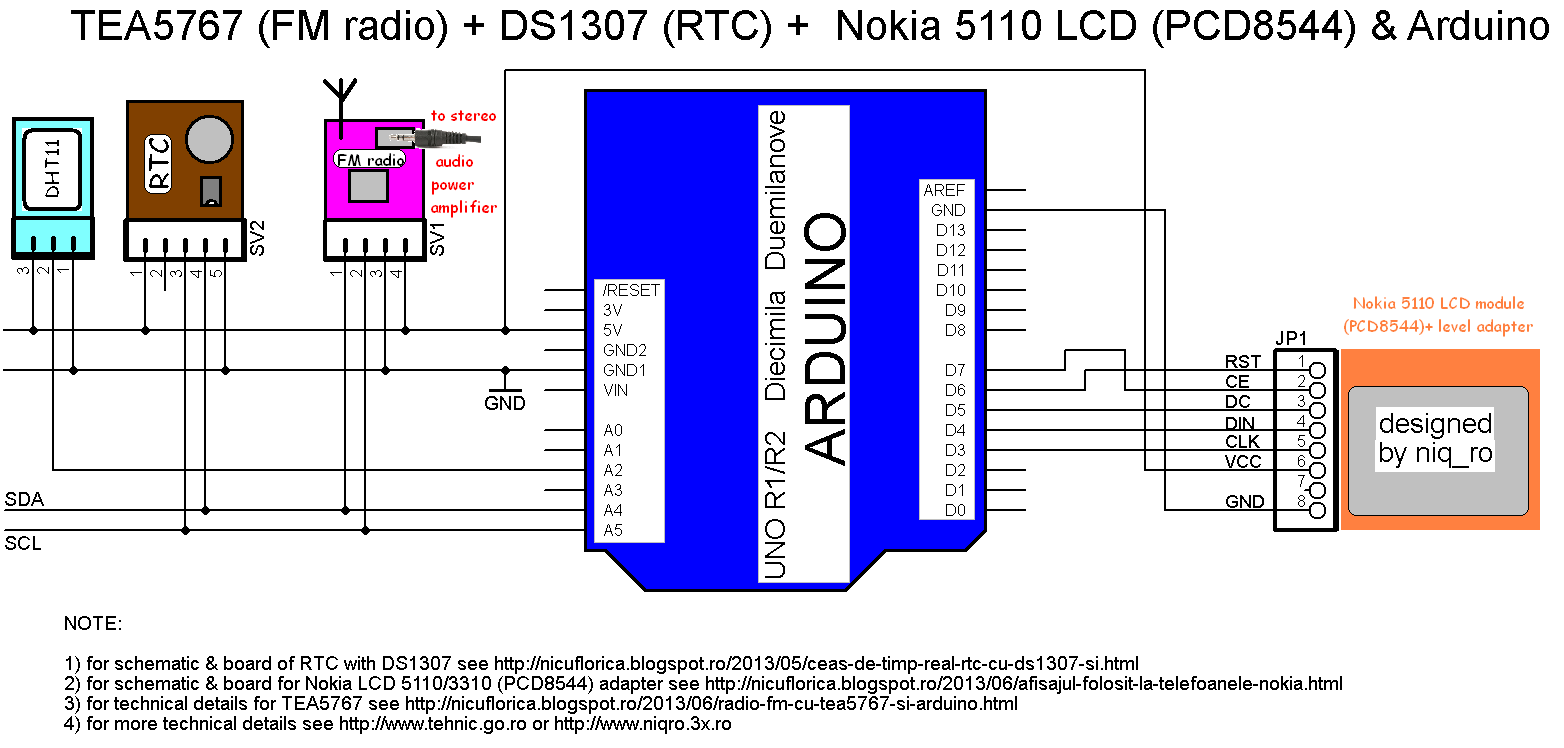
   Fata de partea I, in care am prezentat date generale si am comandat integratul TEA5767 cu placa Arduino si am afisat date pe un LCD cu 16 coloane si 2 randuri, apoi pe unul compatibil Nokia 5110, acum voi conectata si modulul de timp real (RTC) cu integratul DS1307, astfel incat voi avea si informatii despre ora si data.


   Dupa ce am modificat un pic sketch-ul anterior pentru a muta informatiile legate de frecventa radio, am urmatoarea prezentare:
  Am completat sketch-ul cu partea de RTC, obtinand:
/*********************************************************************
This is an example sketch for our Monochrome Nokia 5110 LCD Displays
  Pick one up today in the adafruit shop!
These displays use SPI to communicate, 4 or 5 pins are required to
interface
Adafruit invests time and resources providing this open source code,
please support Adafruit and open-source hardware by purchasing
products from Adafruit!
Written by Limor Fried/Ladyada  for Adafruit Industries.
BSD license, check license.txt for more information
All text above, and the splash screen must be included in any redistribution
*********************************************************************/
// Nokia 5110 LCD (PCD8544) from https://code.google.com/p/pcd8544/

/* niq_ro ( http://nicuflorica.blogspot.ro ) case for Nokia 5110 LCD (PCD8544) - LPH 7366:
 For module from China, you must connect like this:
* Pin 1 (RST) -> Arduino digital 6 (D6)
* Pin 2 (CE) -> Arduino digital 7 (D7)
* Pin 3 (DC) -> Arduino digital 5 (D5)
* Pin 4 (DIN) -> Arduino digital 4 (D4)
* Pin 5 (CLK) - Arduino digital 3 (D3)
* Pin 7 (LIGHT) -> +5V thru 56-100 ohms resistor (for permanent lights) or... other pin control
* Pin 8 (GND) -> GND1 or GND2 
*/

// Date and time functions using a DS1307 RTC connected via I2C and Wire lib
// original sketck from http://learn.adafruit.com/ds1307-real-time-clock-breakout-board-kit/

// adapted sketch by niq_ro from http://nicuflorica.blogspot.ro
// version 4.0 for FM radio with TEA5767 - http://www.tehnic.go.ro

#include <Adafruit_GFX.h>
#include <Adafruit_PCD8544.h>
// Adafruit_PCD8544 display = Adafruit_PCD8544(SCLK, DIN, DC, CS, RST);
Adafruit_PCD8544 display = Adafruit_PCD8544(3, 4, 5, 7, 6);

#include <TEA5767.h>
#include <Wire.h>
#include <Button.h>

// TEA5767 begin
TEA5767 Radio;
double old_frequency;
double frequency;
int search_mode = 0;
int search_direction;
unsigned long last_pressed;

Button btn_forward(11, PULLUP);
Button btn_backward(12, PULLUP);
// TEA5767 end

#include "RTClib.h"
RTC_DS1307 RTC;

void setup () {

  Wire.begin();
  Radio.init();
  Radio.set_frequency(104.5); 
  Serial.begin(9600);

  display.begin();
  // init done

  // you can change the contrast around to adapt the display
  // for the best viewing!
  display.setContrast(60);
  display.clearDisplay();

RTC.begin();
// RTC.adjust(DateTime(__DATE__, __TIME__));
// if you need set clock... just remove // from line above this

// part code for flashing LED
Wire.beginTransmission(0x68);
Wire.write(0x07); // move pointer to SQW address
Wire.write(0x10); // sends 0x10 (hex) 00010000 (binary) to control register - turns on square wave
Wire.endTransmission();

  if (! RTC.isrunning()) {
    Serial.println("RTC is NOT running!");
    // following line sets the RTC to the date & time this sketch was compiled
    RTC.adjust(DateTime(__DATE__, __TIME__));
  }

  // Print a logo message to the LCD.
  display.setTextSize(1);
  display.setTextColor(BLACK);
  display.setCursor(8,0);
  display.println("tehnic.go.ro");
  display.setCursor(20, 8);
  display.print("& niq_ro");
  display.setCursor(16, 24);
  display.print("radio FM");  
  display.setCursor(5, 32);
  display.print("si ceas/data");
  display.setCursor(0, 40);
  display.print("versiunea ");
  display.setTextColor(WHITE, BLACK);
  display.print("4.0");
  display.display();
  delay (5000);
  display.clearDisplay(); 

}

void loop () {
  
  DateTime now = RTC.now();
  unsigned char buf[5];
  int stereo;
  int signal_level;
  double current_freq;
  unsigned long current_millis = millis();
  
  if (Radio.read_status(buf) == 1) {
    current_freq =  floor (Radio.frequency_available (buf) / 100000 + .5) / 10;
    stereo = Radio.stereo(buf);
    signal_level = Radio.signal_level(buf);

   display.setTextSize(2);
   display.setTextColor(BLACK);

  if (current_freq >=100)
   display.setCursor(0,16);
else
   display.setCursor(12,16);
   display.print(display.print(current_freq));

// erase 2 number from right
   for (int x = 16; x < 30; x++)
   { 
   display.drawLine(60, x, 84, x, WHITE);
   }

   display.setTextSize(1);
   display.setCursor(65,19);
   display.print("MHz");

   display.setCursor(0,35);
   display.setTextSize(1);
   display.setTextColor(WHITE, BLACK);
   if (stereo) display.print("STEREO"); else display.print("MONO");
   
   display.display();
   delay (500);
   display.clearDisplay(); 

// draw a signal level triangle...
   display.drawLine(80, 30, 80, 45, BLACK);
   display.drawLine(80, 45, 50, 45, BLACK);
   display.drawLine(50, 45, 80, 30, BLACK);
// draw an antenna
   display.drawLine(55, 32, 55, 40, BLACK);
   display.drawLine(56, 32, 56, 40, BLACK);
   display.drawLine(52, 32, 55, 36, BLACK);
   display.drawLine(51, 32, 55, 37, BLACK);
   display.drawLine(59, 32, 56, 36, BLACK);
   display.drawLine(60, 32, 56, 37, BLACK);
    

int sl = signal_level;
   for (int x = 0; x < sl; x++)
   { 
   display.drawLine(50+2*x, 45, 50+2*x, 45-x, BLACK);
   }


  }
  
  if (search_mode == 1) {
      if (Radio.process_search (buf, search_direction) == 1) {
          search_mode = 0;
      }
  }
  
  if (btn_forward.isPressed()) {
    last_pressed = current_millis;
    search_mode = 1;
    search_direction = TEA5767_SEARCH_DIR_UP;
    Radio.search_up(buf);
    delay(300);
  }
    
  if (btn_backward.isPressed()) {
    last_pressed = current_millis;
    search_mode = 1;
    search_direction = TEA5767_SEARCH_DIR_DOWN;
    Radio.search_down(buf);
    delay(300);
  } 
   delay(100);


   // need for display time 
   int zs = now.second()/10;
   int us = now.second() - zs*10;
  
  if (us > 2 )
 {
   display.setTextSize(2);
   display.setTextColor(BLACK);
   display.setCursor(0, 0);
   
   
   {   if ( now.hour() < 10)
   {
     display.print(" "); 
     display.print(now.hour(), DEC);
   }
   else
   {
     display.print(now.hour(), DEC);
   }
   display.setCursor(20, 0);
   display.print(":");
   display.setCursor(28, 0);
   if ( now.minute() < 10)
   {
     display.print("0"); 
     display.print(now.minute(), DEC);
   }
   else
   {
   display.print(now.minute(), DEC);
   }

   display.setCursor(48, 0);
   display.print(":");
   display.setCursor(57, 0);
   if ( now.second() < 10)
   {
     display.print("0"); 
     display.print(now.second(), DEC);
   }
   else
   {
   display.print(now.second(), DEC);
   }
   }
 }
 else 
 {
   display.setTextSize(1);
   display.setTextColor(BLACK);
   display.setCursor(16, 0);
   if ( now.hour() < 10)
   {
     display.print(" "); 
     display.print(now.hour(), DEC);
   }
   else
   {
   //  display.setCursor(16, 0);
     display.print(now.hour(), DEC);
   }
   display.print(":");
   if ( now.minute() < 10)
   {
     display.print("0"); 
     display.print(now.minute(), DEC);
   }
   else
   {
   display.print(now.minute(), DEC);
   }
   display.print(":");
   if ( now.second() < 10)
   {
     display.print("0"); 
     display.print(now.second(), DEC);
   }
   else
   {
   display.print(now.second(), DEC);
   }
      
   display.setCursor(10, 8);
   if ( now.day() < 10)
   {
     display.print("0"); 
     display.print(now.day(), DEC);
   }
   else
   {
   display.print(now.day(), DEC);
   }
   display.print("/");
   if ( now.month() < 10)
   {
     display.print("0"); 
     display.print(now.month(), DEC);
   }
   else
   {
   display.print(now.month(), DEC);
   }
   display.print("/");
   display.print(now.year(), DEC);
 }

}

   Filmuletul, care prezinta, ce am scris mai sus, se numeste FM radio with TEA5767 and Arduino (III):
29.iun.2013
   Am mai facut un filmulet, numit FM radio with TEA5767 and Arduino (IV)

PS: Am conectat si senzorul DHT11 si am informatii despre temperatura si umiditate, dar pare prea "sorcova", asa ca nu am mai "bibilit" la sketch prea mult...
/*********************************************************************
This is an example sketch for our Monochrome Nokia 5110 LCD Displays
  Pick one up today in the adafruit shop!
  ------> http://www.adafruit.com/products/338
These displays use SPI to communicate, 4 or 5 pins are required to
interface
Adafruit invests time and resources providing this open source code,
please support Adafruit and open-source hardware by purchasing
products from Adafruit!
Written by Limor Fried/Ladyada  for Adafruit Industries.
BSD license, check license.txt for more information
All text above, and the splash screen must be included in any redistribution
*********************************************************************/
// Nokia 5110 LCD (PCD8544) from https://code.google.com/p/pcd8544/

/* niq_ro ( http://nicuflorica.blogspot.ro ) case for Nokia 5110 LCD (PCD8544) - LPH 7366:
 For module from China, you must connect like this:
* Pin 1 (RST) -> Arduino digital 6 (D6)
* Pin 2 (CE) -> Arduino digital 7 (D7)
* Pin 3 (DC) -> Arduino digital 5 (D5)
* Pin 4 (DIN) -> Arduino digital 4 (D4)
* Pin 5 (CLK) - Arduino digital 3 (D3)
* Pin 6 (Vcc) -> +5V thru adaptor module (see http://nicuflorica.blogspot.ro/2013/06/afisajul-folosit-la-telefoanele-nokia.html )
* Pin 7 (LIGHT) -> +5V thru 56-100 ohms resistor (for permanent lights) or... other pin control
* Pin 8 (GND) -> GND1 or GND2 
*/

// Date and time functions using a DS1307 RTC connected via I2C and Wire lib
// original sketck from http://learn.adafruit.com/ds1307-real-time-clock-breakout-board-kit/
// add part with SQW=1Hz from http://tronixstuff.wordpress.com/2010/10/20/tutorial-arduino-and-the-i2c-bus/

// adapted sketch by niq_ro from http://nicuflorica.blogspot.ro
// version 4.1 for FM radio with TEA5767 - http://www.tehnic.go.ro

#include <Adafruit_GFX.h>
#include <Adafruit_PCD8544.h>
// Adafruit_PCD8544 display = Adafruit_PCD8544(SCLK, DIN, DC, CS, RST);
Adafruit_PCD8544 display = Adafruit_PCD8544(3, 4, 5, 7, 6);

#include <TEA5767.h>
// from https://github.com/andykarpov/TEA5767
#include <Wire.h>
#include <Button.h>
// from http://arduino-info.wikispaces.com/file/view/Button.zip/405390486/Button.zip

// TEA5767 begin
TEA5767 Radio;
double old_frequency;
double frequency;
int search_mode = 0;
int search_direction;
unsigned long last_pressed;

Button btn_forward(11, PULLUP);
Button btn_backward(12, PULLUP);
// TEA5767 end

#include <DHT.h>
#define DHTPIN A2     // what pin we're connected DHT11
#define DHTTYPE DHT11   // DHT 11 
DHT dht(DHTPIN, DHTTYPE);

#include "RTClib.h"
RTC_DS1307 RTC;

void setup () {

  Wire.begin();
  Radio.init();
  Radio.set_frequency(104.5); 
  Serial.begin(9600);

 // sensor DHT for humidity and temperature 
  dht.begin();
  display.begin();
  // init DHT done

  // you can change the contrast around to adapt the display
  // for the best viewing!
  display.setContrast(55);
  display.clearDisplay();

RTC.begin();
// RTC.adjust(DateTime(__DATE__, __TIME__));
// if you need set clock... just remove // from line above this

// part code for flashing LED
Wire.beginTransmission(0x68);
Wire.write(0x07); // move pointer to SQW address
// Wire.write(0x00); // turns the SQW pin off
 Wire.write(0x10); // sends 0x10 (hex) 00010000 (binary) to control register - turns on square wave at 1Hz
// Wire.write(0x13); // sends 0x13 (hex) 00010011 (binary) 32kHz

Wire.endTransmission();

  if (! RTC.isrunning()) {
    Serial.println("RTC is NOT running!");
    // following line sets the RTC to the date & time this sketch was compiled
    RTC.adjust(DateTime(__DATE__, __TIME__));
  }

  // Print a logo message to the LCD.
  display.setTextSize(1);
  display.setTextColor(BLACK);
  display.setCursor(8,0);
  display.println("tehnic.go.ro");
  display.setCursor(20, 8);
  display.print("& niq_ro");
  display.setCursor(16, 24);
  display.print("radio FM");  
  display.setCursor(5, 32);
  display.print("si ceas/data");
  display.setCursor(0, 40);
  display.print("versiunea ");
  display.setTextColor(WHITE, BLACK);
  display.print("4.1");
  display.display();
  delay (5000);
  display.clearDisplay(); 

}

void loop () {
  
  DateTime now = RTC.now();
  unsigned char buf[5];
  int stereo;
  int signal_level;
  double current_freq;
  unsigned long current_millis = millis();
  
  if (Radio.read_status(buf) == 1) {
    current_freq =  floor (Radio.frequency_available (buf) / 100000 + .5) / 10;
    stereo = Radio.stereo(buf);
    signal_level = Radio.signal_level(buf);

   display.setTextSize(2);
   display.setTextColor(BLACK);

  if (current_freq >=100)
   display.setCursor(0,16);
else
   display.setCursor(12,16);
   display.print(display.print(current_freq));

// erase 2 number from right
   for (int x = 16; x < 30; x++)
   { 
   display.drawLine(60, x, 84, x, WHITE);
   }

   display.setTextSize(1);
   display.setCursor(65,16);
   display.print("MHz");

   display.setCursor(65,24);
   display.setTextSize(1);
   display.setTextColor(WHITE, BLACK);
   if (stereo) display.print("ST"); else display.print("  ");

  // read value from DHT sensor
  int h = dht.readHumidity();
  int t = dht.readTemperature();

   display.setTextColor(BLACK);
   display.setCursor(6,32);
   display.setTextSize(1);
   display.print(h);
   display.print("%H");
   display.setCursor(0,40);
   display.setTextColor(WHITE, BLACK);
   display.print("+");
   display.print(t);
   display.print("^C ");

   
   display.display();
   delay (500);
   display.clearDisplay(); 

// draw a signal level triangle...
   display.drawLine(80, 30, 80, 45, BLACK);
   display.drawLine(80, 45, 50, 45, BLACK);
   display.drawLine(50, 45, 80, 30, BLACK);
// draw an antenna
   display.drawLine(55, 32, 55, 40, BLACK);
   display.drawLine(56, 32, 56, 40, BLACK);
   display.drawLine(52, 32, 55, 36, BLACK);
   display.drawLine(51, 32, 55, 37, BLACK);
   display.drawLine(59, 32, 56, 36, BLACK);
   display.drawLine(60, 32, 56, 37, BLACK);
    

int sl = signal_level;
   for (int x = 0; x < sl; x++)
   { 
   display.drawLine(50+2*x, 45, 50+2*x, 45-x, BLACK);
   }


  }
  
  if (search_mode == 1) {
      if (Radio.process_search (buf, search_direction) == 1) {
          search_mode = 0;
      }
  }
  
  if (btn_forward.isPressed()) {
    last_pressed = current_millis;
    search_mode = 1;
    search_direction = TEA5767_SEARCH_DIR_UP;
    Radio.search_up(buf);
    delay(300);
  }
    
  if (btn_backward.isPressed()) {
    last_pressed = current_millis;
    search_mode = 1;
    search_direction = TEA5767_SEARCH_DIR_DOWN;
    Radio.search_down(buf);
    delay(300);
  } 
   delay(100);


   // need for display time 
   int zs = now.second()/10;
   int us = now.second() - zs*10;
  
  if (us > 2 )
 {
   display.setTextSize(2);
   display.setTextColor(BLACK);
   display.setCursor(0, 0);
   
   
   {   if ( now.hour() < 10)
   {
     display.print(" "); 
     display.print(now.hour(), DEC);
   }
   else
   {
     display.print(now.hour(), DEC);
   }
   display.setCursor(20, 0);
   display.print(":");
   display.setCursor(28, 0);
   if ( now.minute() < 10)
   {
     display.print("0"); 
     display.print(now.minute(), DEC);
   }
   else
   {
   display.print(now.minute(), DEC);
   }

   display.setCursor(48, 0);
   display.print(":");
   display.setCursor(57, 0);
   if ( now.second() < 10)
   {
     display.print("0"); 
     display.print(now.second(), DEC);
   }
   else
   {
   display.print(now.second(), DEC);
   }
   }
 }
 else 
 {
   display.setTextSize(1);
   display.setTextColor(BLACK);
   display.setCursor(16, 0);
   if ( now.hour() < 10)
   {
     display.print(" "); 
     display.print(now.hour(), DEC);
   }
   else
   {
   //  display.setCursor(16, 0);
     display.print(now.hour(), DEC);
   }
   display.print(":");
   if ( now.minute() < 10)
   {
     display.print("0"); 
     display.print(now.minute(), DEC);
   }
   else
   {
   display.print(now.minute(), DEC);
   }
   display.print(":");
   if ( now.second() < 10)
   {
     display.print("0"); 
     display.print(now.second(), DEC);
   }
   else
   {
   display.print(now.second(), DEC);
   }
      
   display.setCursor(10, 8);
   if ( now.day() < 10)
   {
     display.print("0"); 
     display.print(now.day(), DEC);
   }
   else
   {
   display.print(now.day(), DEC);
   }
   display.print("/");
   if ( now.month() < 10)
   {
     display.print("0"); 
     display.print(now.month(), DEC);
   }
   else
   {
   display.print(now.month(), DEC);
   }
   display.print("/");
   display.print(now.year(), DEC);
 }

}
   Schema de conectare devine: