Pentru diverse sisteme de automatizare in care se doreste reglajul anumitor parametrii se folosesc meniuri mai simple sau mai complexe.
In articolul Tutorial: manage menu and LCD display with Arduino este prezentat un meniu controlat cu 4 butoane fara retinere (selectie, renuntare, inainte/dreapta inapoi/stanga) in care se foloseste o libraria libraria MenuBackend modificata. In acel material se folosesc 4 butoane fara retinere cu contact intre pinii de intrare si plus, iar pinii sunt conectati prin rezistente la masa.
iar meniul are 3 submeniuri, primul submeniu mai are 2 sub-submeniuri, al doilea submeniu are 3 sus-submeniuri, iar al treilea submeniu e fara sub-submeniuri.
Eu am modificat sketch-ul pentru a elimina rezistentele, folosindu-ma de cele interne, pe care le pun in 1 logic (HIGH), deci am contact catre masa, schema devenind:
si diverse faze se pot vedea in imaginile urmatoare:
- meniul principal
- primul submeniu
- al doilea submeniu
- al treilea submeniu
- sub-submeniurile de la submeniul 1:
- sub-submeniurile de la submeniul 2:
Dupa cum am vazut cum functioneaza, am rescris sketch-ul (3menu_3submenu_each_ver2m0.ino) sa am cate 3 sub-submeniuri la fiecare submeniu, iar asta se vede in filmuletele:
Am gasit articolul Arduino Astronomical Clock (or Arduino Pond Pump Controller!) care are un ceas pe baza integratului DS1307, pe care l-am folosit si eu, dar are 2 facilitati interesante: reglajul orei si datei din encoderul rotativ + calcul perioadei cat soarele este pe cer (rasarit si apus soare).
Am reprodus si eu experimentul pentru a intelege modul de schimbare al orei si datei, mai putin releul...
Daca se apasa pentru scurt timp se afiseaza orele de rasarit si de apus ale soarelui.
iar la o noua apasare, se alege modul de actionare la unui releu: AUTO (pe durata zilei, mereu actionat contact sau permanent decuplat contact), asta deoarece se folosea pentru alimentarea pe timpul zilei a unei fantani arteziene.
Daca se apasa lung (mai mult de 3 secunde) se intra in modul de reglaj:
- an:
- luna:
- zi:
- ora:
- minute:
Pentru a putea calcula perioada cat soarele este pe cer se foloseste o librarie speciala, TimeLord.h (se poate descarca si de la aici), care necesita introducerea in sketch a coordonatelor GPS alel localitatii si a orei locale fata cea de baza:
Pentru verificarea datelor, am cautat si, evident, gasit orele de rasarit si apus ale soarelui pentru ziua respectiva:
si se observa ca eroare este doar de cateva minute, rasaritul de soare este calculat de Arduino ca fiind la 7:59, iar pe site am gasit ca a fost 8:00, respectiv apusul soarelui a fost calculat ca fiind la 17:02, iar pe site este 17:04.
Revenind la partea care m-a interesat in mod deosebit, am adaugat si un modul cu senzor DHT11 pentru a pune si umiditatea si temperatura, conectand pinul de date la A1:
Sketch-ul folosit de mine este:
// Dawn & Dusk controller. http://andydoz.blogspot.ro/2014_08_01_archive.html// 16th August 2014.// (C) A.G.Doswell 2014// adapted sketch by niq_ro from http://nicuflorica.blogspot.ro & http://arduinotehniq.blogspot.com/// Date and time functions using a DS1307 RTC connected via I2C and Wire lib//// Designed to control a relay connected to pin A3. Pin goes low during daylight hours and high during night. Relay uses active low, so is// "On" during the day. This is connected to the fountain pump in my garden.//// Time is set using a rotary encoder with integral push button. The Encoder is connected to interrupt pins D2 & D3 (and GND), // and the push button to pin analogue 0 (and GND)// The RTC is connections are: Analogue pin 4 to SDA. Connect analogue pin 5 to SCL.// A 2 x 16 LCD display is connected as follows (NOTE. This is NOT conventional, as interrupt pins are required for the encoder)// Arduino LCD // D4 DB7// D5 DB6// D6 DB5// D7 DB4// D12 RS// D13 E// // Use: Pressing and holding the button will enter the clock set mode (on release of the button). Clock is set using the rotary encoder. // The clock must be set to UTC.// Pressing and releasing the button quickly will display the current sun rise and sun set times. Pressing the button again will enter the mode select menu. // Modes are AUTO: On when the sun rises, off when it sets.// ON: Permanently ON// OFF: Permanently OFF (Who'd have guessed it?)//// Change the LATTITUDE and LONGITUDE constant to your location.
#include <Wire.h>
#include "RTClib.h"// from https://github.com/adafruit/RTClib
#include <LiquidCrystal.h>
#include <Encoder.h> // from http://www.pjrc.com/teensy/td_libs_Encoder.html
#include <TimeLord.h> // from http://swfltek.com/arduino/timelord.html. When adding it to your IDE, rename the file, removing the "-depreciated" // http://www.timeanddate.com/sun/romania/craiova - for control sun timeRTC_DS1307RTC; // Tells the RTC library that we're using a DS1307 RTCEncoder knob(2, 3); //encoder connected to pins 2 and 3 (and ground)LiquidCrystal lcd(12, 13, 7, 6, 5, 4); // I used an odd pin combination because I need pin 2 and 3 for the interrupts.//the variables provide the holding values for the set clock routineint setyeartemp;
int setmonthtemp;
int setdaytemp;
int sethourstemp;
int setminstemp;
int setsecs = 0;
int maxday; // maximum number of days in the given monthint TimeMins; // number of seconds since midnightint TimerMode = 2; //mode 0=Off 1=On 2=Autoint TimeOut = 10;
int TimeOutCounter;
// These variables are for the push button routineint buttonstate = 0; //flag to see if the button has been pressed, used internal on the subroutine onlyint pushlengthset = 3000; // value for a long push in mSint pushlength = pushlengthset; // set default pushlengthint pushstart = 0;// sets default push value for the button going lowint pushstop = 0;// sets the default value for when the button goes back highint knobval; // value for the rotation of the knobboolean buttonflag = false; // default value for the button flag//const int TIMEZONE = 0; //UTCconstint TIMEZONE = 2; //UTC Craiova (Romania) - http://www.worldtimebuddy.com/utc-to-romania-craiova//const float LATITUDE = 51.89, LONGITUDE = -2.04; // set YOUR position here constfloat LATITUDE = 44.3167, LONGITUDE = 23.8; // Craiova GPS positionint Sunrise, Sunset; //sunrise and sunset expressed as minute of day (0-1439)
TimeLord myLord; // TimeLord Object, Global variablebyte sunTime[] = {0, 0, 0, 1, 1, 13}; // 17 Oct 2013int SunriseHour, SunriseMin, SunsetHour, SunsetMin; //Variables used to make a decent display of our sunset and sunrise time.// http://arduino.cc/en/Reference/LiquidCrystalCreateCharbyte grad[8] = {
B01100,
B10010,
B10010,
B01100,
B00000,
B00000,
B00000,
};
#include <DHT.h>
#define DHTPIN A1 // what pin we're connected DHT11/22
#define DHTTYPE DHT11 // DHT 11 //#define DHTTYPE DHT22 // DHT 22
DHT dht(DHTPIN, DHTTYPE);
float t1;
voidsetup () {
//Serial.begin(57600); //start debug serial interfaceWire.begin(); //start I2C interfaceRTC.begin(); //start RTC interface
dht.begin(); // DHT init
lcd.createChar(0, grad); // create custom symbol
lcd.begin(16,2); //Start LCD (defined as 16 x 2 characters)
lcd.clear();
pinMode(A0,INPUT);//push button on encoder connected to A0 (and GND)digitalWrite(A0,HIGH); //Pull A0 highpinMode(A3,OUTPUT); //Relay connected to A3digitalWrite (A3, HIGH); //sets relay off (default condition)//Checks to see if the RTC is runnning, and if not, sets the time to the time this sketch was compiled.if (! RTC.isrunning()) {
RTC.adjust(DateTime(__DATE__, __TIME__));
}
//Timelord initialisation
myLord.TimeZone(TIMEZONE * 60);
myLord.Position(LATITUDE, LONGITUDE);
CalcSun ();
}
voidloop () {
int h = dht.readHumidity();
float t = dht.readTemperature();
lcd.setCursor(11, 1);
// lcd.print("t=");if (t < 0)
{t1=-t;}
else t1=t;
if ( t1 < 10)
{
lcd.print(" ");
}
if (t>0) lcd.print("+");
if (t==0) lcd.print(" ");
if (t<0) lcd.print("-");
lcd.print(t1,0);
//lcd.print(",0");// lcd.write(0b11011111);
lcd.write(byte(0));
lcd.print("C");
lcd.setCursor(11, 0);
// lcd.print("H=");
lcd.print(h);
lcd.print("%RH");
DateTimenow = RTC.now(); //get time from RTC//Display current time
lcd.setCursor (0,0);
lcd.print(now.day(), DEC);
lcd.print('/');
lcd.print(now.month());
lcd.print('/');
lcd.print(now.year(), DEC);
lcd.print(" ");
lcd.setCursor (0,1);
lcd.print(now.hour(), DEC);
lcd.print(':');
if (now.minute() <10)
{
lcd.print("0");
}
lcd.print(now.minute(), DEC);
lcd.print(':');
if (now.second() <10)
{
lcd.print("0");
}
lcd.print(now.second());
// lcd.print(" ");//current time in minutes since midnight (used to check against sunrise/sunset easily)
TimeMins = (now.hour() * 60) + now.minute();
// Calculate sun times once a day at a minute past midnightif (TimeMins == 1) {
CalcSun ();
}
if (TimerMode ==2) {
if (TimeMins >= Sunrise && TimeMins <=Sunset-1) { //If it's after sunrise and before sunset, switch our relay ondigitalWrite (A3, LOW);
lcd.setCursor (9,1);
lcd.print ("*");
}
else { //otherwise switch it offdigitalWrite (A3, HIGH);
lcd.setCursor (9,1);
lcd.print ("!");
}
}
if (TimerMode ==0) {
digitalWrite (A3, HIGH);
lcd.setCursor (9,1);
lcd.print ("!");
}
if (TimerMode ==1) {
digitalWrite (A3, LOW);
lcd.setCursor (9,1);
lcd.print ("*");
}
pushlength = pushlengthset;
pushlength = getpushlength ();
delay (10);
if (pushlength <pushlengthset) {
ShortPush ();
}
//This runs the setclock routine if the knob is pushed for a long timeif (pushlength >pushlengthset) {
lcd.clear();
DateTimenow = RTC.now();
setyeartemp=now.year(),DEC;
setmonthtemp=now.month(),DEC;
setdaytemp=now.day(),DEC;
sethourstemp=now.hour(),DEC;
setminstemp=now.minute(),DEC;
setclock();
pushlength = pushlengthset;
};
}
//sets the clockvoid setclock (){
setyear ();
lcd.clear ();
setmonth ();
lcd.clear ();
setday ();
lcd.clear ();
sethours ();
lcd.clear ();
setmins ();
lcd.clear();
RTC.adjust(DateTime(setyeartemp,setmonthtemp,setdaytemp,sethourstemp,setminstemp,setsecs));
CalcSun ();
delay (1000);
}
// subroutine to return the length of the button push.int getpushlength () {
buttonstate = digitalRead(A0);
if(buttonstate == LOW && buttonflag==false) {
pushstart = millis();
buttonflag = true;
};
if (buttonstate == HIGH && buttonflag==true) {
pushstop = millis ();
pushlength = pushstop - pushstart;
buttonflag = false;
};
return pushlength;
}
// The following subroutines set the individual clock parametersint setyear () {
//lcd.clear();
lcd.setCursor (0,0);
lcd.print ("Set Year");
pushlength = pushlengthset;
pushlength = getpushlength ();
if (pushlength != pushlengthset) {
return setyeartemp;
}
lcd.setCursor (0,1);
knob.write(0);
delay (50);
knobval=knob.read();
if (knobval < -1) { //bit of software de-bounce
knobval = -1;
}
if (knobval > 1) {
knobval = 1;
}
setyeartemp=setyeartemp + knobval;
if (setyeartemp < 2014) { //Year can't be older than currently, it's not a time machine.
setyeartemp = 2014;
}
lcd.print (setyeartemp);
lcd.print(" ");
setyear();
}
int setmonth () {
//lcd.clear();
lcd.setCursor (0,0);
lcd.print ("Set Month");
pushlength = pushlengthset;
pushlength = getpushlength ();
if (pushlength != pushlengthset) {
return setmonthtemp;
}
lcd.setCursor (0,1);
knob.write(0);
delay (50);
knobval=knob.read();
if (knobval < -1) {
knobval = -1;
}
if (knobval > 1) {
knobval = 1;
}
setmonthtemp=setmonthtemp + knobval;
if (setmonthtemp < 1) {// month must be between 1 and 12
setmonthtemp = 1;
}
if (setmonthtemp > 12) {
setmonthtemp=12;
}
lcd.print (setmonthtemp);
lcd.print(" ");
setmonth();
}
int setday () {
if (setmonthtemp == 4 || setmonthtemp == 5 || setmonthtemp == 9 || setmonthtemp == 11) { //30 days hath September, April June and November
maxday = 30;
}
else {
maxday = 31; //... all the others have 31
}
if (setmonthtemp ==2 && setyeartemp % 4 ==0) { //... Except February alone, and that has 28 days clear, and 29 in a leap year.
maxday = 29;
}
if (setmonthtemp ==2 && setyeartemp % 4 !=0) {
maxday = 28;
}
//lcd.clear();
lcd.setCursor (0,0);
lcd.print ("Set Day");
pushlength = pushlengthset;
pushlength = getpushlength ();
if (pushlength != pushlengthset) {
return setdaytemp;
}
lcd.setCursor (0,1);
knob.write(0);
delay (50);
knobval=knob.read();
if (knobval < -1) {
knobval = -1;
}
if (knobval > 1) {
knobval = 1;
}
setdaytemp=setdaytemp+ knobval;
if (setdaytemp < 1) {
setdaytemp = 1;
}
if (setdaytemp > maxday) {
setdaytemp = maxday;
}
lcd.print (setdaytemp);
lcd.print(" ");
setday();
}
int sethours () {
//lcd.clear();
lcd.setCursor (0,0);
lcd.print ("Set Hours");
pushlength = pushlengthset;
pushlength = getpushlength ();
if (pushlength != pushlengthset) {
return sethourstemp;
}
lcd.setCursor (0,1);
knob.write(0);
delay (50);
knobval=knob.read();
if (knobval < -1) {
knobval = -1;
}
if (knobval > 1) {
knobval = 1;
}
sethourstemp=sethourstemp + knobval;
if (sethourstemp < 1) {
sethourstemp = 1;
}
if (sethourstemp > 23) {
sethourstemp=23;
}
lcd.print (sethourstemp);
lcd.print(" ");
sethours();
}
int setmins () {
//lcd.clear();
lcd.setCursor (0,0);
lcd.print ("Set Mins");
pushlength = pushlengthset;
pushlength = getpushlength ();
if (pushlength != pushlengthset) {
return setminstemp;
}
lcd.setCursor (0,1);
knob.write(0);
delay (50);
knobval=knob.read();
if (knobval < -1) {
knobval = -1;
}
if (knobval > 1) {
knobval = 1;
}
setminstemp=setminstemp + knobval;
if (setminstemp < 0) {
setminstemp = 0;
}
if (setminstemp > 59) {
setminstemp=59;
}
lcd.print (setminstemp);
lcd.print(" ");
setmins();
}
int setmode () { //Sets the mode of the timer. Auto, On or Off//lcd.clear();
lcd.setCursor (0,0);
lcd.print ("Set Mode");
pushlength = pushlengthset;
pushlength = getpushlength ();
if (pushlength != pushlengthset) {
return TimerMode;
}
lcd.setCursor (0,1);
knob.write(0);
delay (50);
knobval=knob.read();
if (knobval < -1) {
knobval = -1;
}
if (knobval > 1) {
knobval = 1;
}
TimerMode=TimerMode + knobval;
if (TimerMode < 0) {
TimerMode = 0;
}
if (TimerMode > 2) {
TimerMode=2;
}
if (TimerMode == 0) {
lcd.print("Off (!)");
lcd.print(" ");
}
if (TimerMode == 1) {
lcd.print("On (*)");
lcd.print(" ");
}
if (TimerMode == 2) {
lcd.print("Auto");
lcd.print(" ");
}
setmode ();
}
int CalcSun () { //Calculates the Sunrise and Sunset timesDateTimenow = RTC.now();
sunTime[3] = now.day(); // Give Timelord the current date
sunTime[4] = now.month();
sunTime[5] = now.year();
myLord.SunRise(sunTime); // Computes Sun Rise.
Sunrise = sunTime[2] * 60 + sunTime[1]; // Sunrise returned in minutes past midnight
SunriseHour = sunTime[2];
SunriseMin = sunTime [1];
sunTime[3] = now.day(); // Uses the Time library to give Timelord the current date
sunTime[4] = now.month();
sunTime[5] = now.year();
myLord.SunSet(sunTime); // Computes Sun Set.
Sunset = sunTime[2] * 60 + sunTime[1]; // Sunset returned in minutes past midnight
SunsetHour = sunTime[2];
SunsetMin = sunTime [1];
}
void ShortPush () {
//This displays the calculated sunrise and sunset times when the knob is pushed for a short time.
lcd.clear();
for (long Counter = 0; Counter < 604 ; Counter ++) { //returns to the main loop if it's been run 604 times //(don't ask me why I've set 604,it seemed like a good number)
lcd.setCursor (0,0);
lcd.print ("Sunrise ");
lcd.print (SunriseHour);
lcd.print (":");
if (SunriseMin <10)
{
lcd.print("0");
}
lcd.print (SunriseMin);
lcd.setCursor (0,1);
lcd.print ("Sunset ");
lcd.print (SunsetHour);
lcd.print (":");
if (SunsetMin <10)
{
lcd.print("0");
}
lcd.print (SunsetMin);
//If the knob is pushed again, enter the mode set menu
pushlength = pushlengthset;
pushlength = getpushlength ();
if (pushlength != pushlengthset) {
lcd.clear ();
TimerMode = setmode ();
}
}
lcd.clear();
}
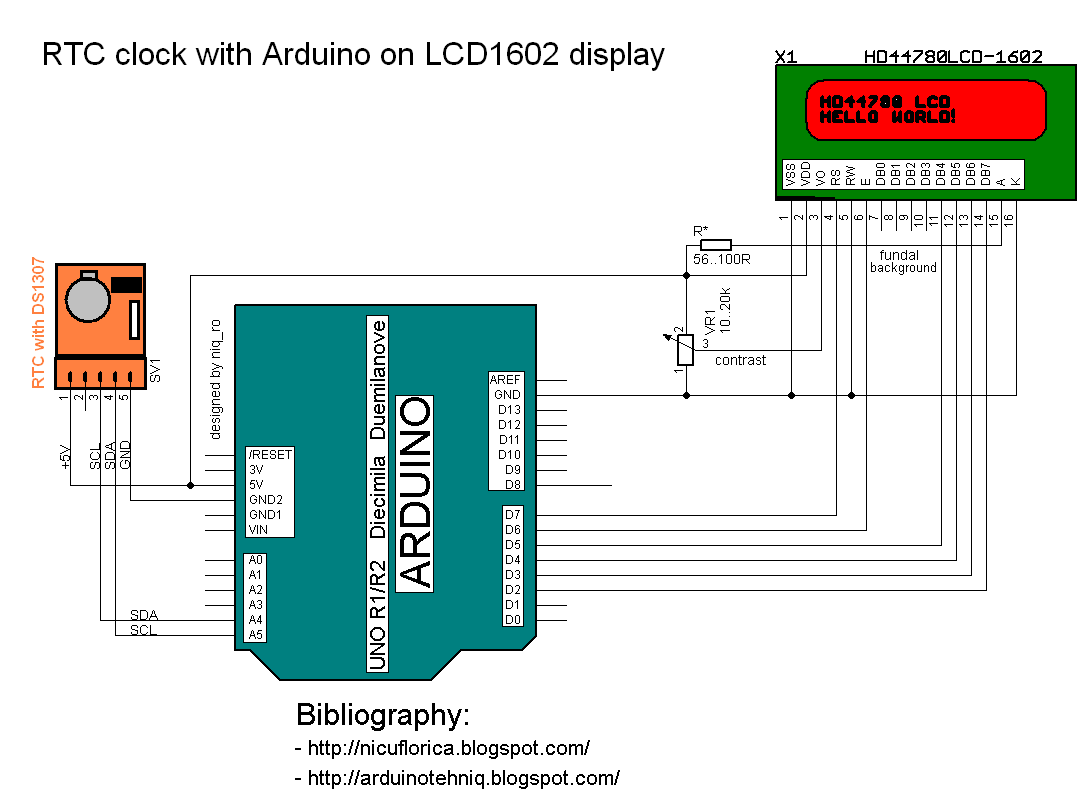
actualizat poze in 11.08.2015 In articolul Ceas de timp real (RTC) cu DS1307 si Arduino (partea a 2-a) am folosit modulul RTC (ceas de timp real), ulterior, si senzorul de temperatura si umiditate DHT11, cu un afisaj alfanumeric cu 16 coloane si 2 randuri (LCD1602) conectat la placa Arduino prin intermediul unei interfete i2c, de data asta am conectat afisajul clasic, dupa cum se vede in schema de mai jos:
Am avut la indemana 3 afisaje alfanumerice:
Sketch-ul folosit este adaptarea celui din articolul mentionat anterior, schimband partea de interfata i2c cu conectarea clasica a afisajului, dar pentru cei incepatori, il postez si pe acesta:
// Date and time functions using a DS1307 RTC // original sketck from http://learn.adafruit.com/ds1307-real-time-clock-breakout-board-kit/// add part with SQW=1Hz from http://tronixstuff.wordpress.com/ & http://www.bristolwatch.com/arduino/arduino_ds1307.htm// adapted sketch by niq_ro from http://nicuflorica.blogspot.ro/// original article from http://nicuflorica.blogspot.ro/2013/06/ceas-de-timp-real-rtc-cu-ds1307-si.html
#include <Wire.h>
#include "RTClib.h"// include the library code:
#include <LiquidCrystal.h>
// initialize the library with the numbers of the interface pinsLiquidCrystal lcd(7, 6, 5, 4, 3, 2);
RTC_DS1307 RTC;
voidsetup () {
// set up the LCD's number of columns and rows:
lcd.begin(16, 2);
// Print a logo message to the LCD.
lcd.print("www.tehnic.go.ro");
lcd.setCursor(0, 1);
lcd.print("creat de niq_ro");
delay (2500);
lcd.clear();
// Serial.begin(9600);Wire.begin();
// part code from http://tronixstuff.wordpress.com/Wire.beginTransmission(0x68);
Wire.write(0x07); // move pointer to SQW addressWire.write(0x10); // sends 0x10 (hex) 00010000 (binary) to control register - turns on square waveWire.endTransmission();
// end part code from http://tronixstuff.wordpress.com/
RTC.begin();
if (! RTC.isrunning()) {
//Serial.println("RTC is NOT running!");// following line sets the RTC to the date & time this sketch was compiled
RTC.adjust(DateTime(__DATE__, __TIME__));
}
}
voidloop () {
DateTimenow = RTC.now();
lcd.setCursor(4, 0);
if ( now.hour() < 10)
{
lcd.print(" ");
lcd.print(now.hour(), DEC);
}
else
{
lcd.print(now.hour(), DEC);
}
lcd.print(":");
if ( now.minute() < 10)
{
lcd.print("0");
lcd.print(now.minute(), DEC);
}
else
{
lcd.print(now.minute(), DEC);
}
lcd.print(":");
if ( now.second() < 10)
{
lcd.print("0");
lcd.print(now.second(), DEC);
}
else
{
lcd.print(now.second(), DEC);
}
lcd.print(" ");
lcd.setCursor(3, 1);
if ( now.day() < 10)
{
lcd.print("0");
lcd.print(now.day(), DEC);
}
else
{
lcd.print(now.day(), DEC);
}
lcd.print("/");
if ( now.month() < 10)
{
lcd.print("0");
lcd.print(now.month(), DEC);
}
else
{
lcd.print(now.month(), DEC);
}
lcd.print("/");
lcd.print(now.year(), DEC);
lcd.print(" ");
delay(1000);
}
Dupa asta, am conectat si modulul cu senzorul DHT11, care poate furniza date despre temperatura cu eroare de +20C, iar despre umiditate cu eroare de +5 unitati. Schema de conectare devine:
Sketch-ul adaptat devine:
// Date and time functions using a DS1307 RTC // original sketck from http://learn.adafruit.com/ds1307-real-time-clock-breakout-board-kit/// add part with SQW=1Hz from http://tronixstuff.wordpress.com & http://www.bristolwatch.com/arduino/arduino_ds1307.htm// adapted sketch by niq_ro from http://nicuflorica.blogspot.ro/// original article from http://nicuflorica.blogspot.ro/2013/06/ceas-de-timp-real-rtc-cu-ds1307-si.html
#include <Wire.h>
#include "RTClib.h"// include the library code:
#include <LiquidCrystal.h>
// initialize the library with the numbers of the interface pinsLiquidCrystal lcd(7, 6, 5, 4, 3, 2);
RTC_DS1307 RTC;
#include <DHT.h>
#define DHTPIN A2 // what pin we're connected DHT11
#define DHTTYPE DHT11 // DHT 11
DHT dht(DHTPIN, DHTTYPE);
voidsetup () {
// DHT init
dht.begin();
// set up the LCD's number of columns and rows:
lcd.begin(16, 2);
// Print a logo message to the LCD.
lcd.print("www.tehnic.go.ro");
lcd.setCursor(0, 1);
lcd.print("creat de niq_ro");
delay (2500);
lcd.clear();
// Serial.begin(9600);Wire.begin();
// part code from http://tronixstuff.wordpress.com/Wire.beginTransmission(0x68);
Wire.write(0x07); // move pointer to SQW addressWire.write(0x10); // sends 0x10 (hex) 00010000 (binary) to control register - turns on square waveWire.endTransmission();
// end part code from http://tronixstuff.wordpress.com/
RTC.begin();
if (! RTC.isrunning()) {
//Serial.println("RTC is NOT running!");// following line sets the RTC to the date & time this sketch was compiled
RTC.adjust(DateTime(__DATE__, __TIME__));
}
}
voidloop () {
DateTimenow = RTC.now();
int h = dht.readHumidity();
int t = dht.readTemperature();
lcd.setCursor(1, 0);
if ( now.hour() < 10)
{
lcd.print(" ");
lcd.print(now.hour(), DEC);
}
else
{
lcd.print(now.hour(), DEC);
}
lcd.print(":");
if ( now.minute() < 10)
{
lcd.print("0");
lcd.print(now.minute(), DEC);
}
else
{
lcd.print(now.minute(), DEC);
}
lcd.print(":");
if ( now.second() < 10)
{
lcd.print("0");
lcd.print(now.second(), DEC);
}
else
{
lcd.print(now.second(), DEC);
}
lcd.print(" ");
lcd.setCursor(11, 0);
// lcd.print("t=");if ( t < 10)
{
lcd.print(" ");
lcd.print(t);
}
else
{
lcd.print(t);
}
lcd.write(0b11011111);
lcd.print("C");
lcd.setCursor(0, 1);
if ( now.day() < 10)
{
lcd.print("0");
lcd.print(now.day(), DEC);
}
else
{
lcd.print(now.day(), DEC);
}
lcd.print("/");
if ( now.month() < 10)
{
lcd.print("0");
lcd.print(now.month(), DEC);
}
else
{
lcd.print(now.month(), DEC);
}
lcd.print("/");
lcd.print(now.year(), DEC);
lcd.print(" ");
lcd.setCursor(11, 1);
// lcd.print("H=");
lcd.print(h);
lcd.print("%RH");
delay(1000);
}
La sugestia lui Janios, un cititor al blogului, am eliminat partea de data, pastrand doar ora si temperatura si umiditatea oferite de senzorul DHT11.
M-am gandit ca acum pot pune partea de reglaj al orei din butoane, cum am facut si la ceasul cu afisaje LCD cu 7 sesegmente multiplexate, care l-am prezentat in articolul Afisaje LED cu 7 segmente si.. Arduino (IV), asa ca schema devine:
Dupa cum se observa, am mutat senzorul DHT11 pe pinul D8, iar tastele pentru intrarea in modul de reglaj, de schimare ore si munute sunt pe partea de senzori analogici, pe post de intrari digitale.
Modul de conectare poate fi diferit de al meu, dar trebuie definite in sketch:
// Date and time functions using a DS1307 RTC // original sketck from http://learn.adafruit.com/ds1307-real-time-clock-breakout-board-kit/// add part with SQW=1Hz from http://tronixstuff.wordpress.com/ & http://www.bristolwatch.com/arduino/arduino_ds1307.htm// adapted sketch by niq_ro from http://nicuflorica.blogspot.ro/// original article from http://nicuflorica.blogspot.ro/2013/06/ceas-de-timp-real-rtc-cu-ds1307-si.html
#include <Wire.h>
#include "RTClib.h"// include the library code:
#include <LiquidCrystal.h>
// initialize the library with the numbers of the interface pinsLiquidCrystal lcd(7, 6, 5, 4, 3, 2);
/* ------------------- | LCD | Arduino | ------------------- LCD RS pin to digital pin 7 | RS | D7 | LCD Enable pin to digital pin 6 | E | D6 | LCD D4 pin to digital pin 5 | D4 | D6 | LCD D5 pin to digital pin 4 | D5 | D4 | LCD D6 pin to digital pin 3 | D6 | D3 | LCD D7 pin to digital pin 2 | D7 | D2 | LCD R/W pin to ground | R/W | GND | -------------------*/RTC_DS1307 RTC;
#include <DHT.h>
#define DHTPIN 8 // what pin we're connected DHT11
#define DHTTYPE DHT11 // DHT 11
DHT dht(DHTPIN, DHTTYPE);
byte SW0 = A0;
byte SW1 = A1;
byte SW2 = A2;
// use for hexa in zecimal conversionint zh, uh, ore;
int zm, um, miniti;
voidsetup () {
// DHT init
dht.begin();
// set up the LCD's number of columns and rows:
lcd.begin(16, 2);
// Print a logo message to the LCD.
lcd.print("www.tehnic.go.ro");
lcd.setCursor(0, 1);
lcd.print("creat de niq_ro");
delay (2500);
lcd.clear();
// Serial.begin(9600);Wire.begin();
// part code from http://tronixstuff.wordpress.com/Wire.beginTransmission(0x68);
Wire.write(0x07); // move pointer to SQW addressWire.write(0x10); // sends 0x10 (hex) 00010000 (binary) to control register - turns on square waveWire.endTransmission();
// end part code from http://tronixstuff.wordpress.com/
RTC.begin();
if (! RTC.isrunning()) {
//Serial.println("RTC is NOT running!");// following line sets the RTC to the date & time this sketch was compiled
RTC.adjust(DateTime(__DATE__, __TIME__));
}
pinMode(SW0, INPUT); // for this use a slide switchpinMode(SW1, INPUT); // N.O. push button switchpinMode(SW2, INPUT); // N.O. push button switchdigitalWrite(SW0, HIGH); // pull-ups ondigitalWrite(SW1, HIGH);
digitalWrite(SW2, HIGH);
}
voidloop () {
DateTimenow = RTC.now();
int h = dht.readHumidity();
int t = dht.readTemperature();
lcd.setCursor(4, 0);
if ( now.hour() < 10)
{
lcd.print(" ");
lcd.print(now.hour(), DEC);
}
else
{
lcd.print(now.hour(), DEC);
}
lcd.print(":");
if ( now.minute() < 10)
{
lcd.print("0");
lcd.print(now.minute(), DEC);
}
else
{
lcd.print(now.minute(), DEC);
}
lcd.print(":");
if ( now.second() < 10)
{
lcd.print("0");
lcd.print(now.second(), DEC);
}
else
{
lcd.print(now.second(), DEC);
}
lcd.print(" ");
lcd.setCursor(1, 1);
// lcd.print("t=");if ( t < 10)
{
lcd.print(" ");
lcd.print(t);
}
else
{
lcd.print(t);
}
//lcd.print(",0");
lcd.write(0b11011111);
lcd.print("C");
/* lcd.setCursor(0, 1); if ( now.day() < 10) { lcd.print("0"); lcd.print(now.day(), DEC); } else { lcd.print(now.day(), DEC); } lcd.print("/"); if ( now.month() < 10) { lcd.print("0"); lcd.print(now.month(), DEC); } else { lcd.print(now.month(), DEC); } lcd.print("/"); lcd.print(now.year(), DEC); lcd.print(" "); */
lcd.setCursor(10, 1);
// lcd.print("H=");
lcd.print(h);
lcd.print("%RH");
if (!(digitalRead(SW0))) set_time(); // hold the switch to set timedelay(500);
}
void set_time() {
byte minutes1 = 0;
byte hours1 = 0;
byte minutes = 0;
byte hours = 0;
while (!digitalRead(SW0)) // set time switch must be released to exit
{
minutes1=minutes;
hours1=hours;
while (!digitalRead(SW1)) // set minutes
{
minutes++;
// converting hexa in zecimal:
zh = hours / 16;
uh = hours - 16 * zh ;
ore = 10 * zh + uh;
zm = minutes / 16;
um = minutes - 16 * zm ;
miniti = 10 * zm + um;
/* for(int i = 20 ; i >0 ; i--) { displayNumber01(ore*100+miniti); } */
lcd.setCursor(4, 0);
if ( ore < 10)
{
lcd.print(" ");
lcd.print(ore);
}
else
{
lcd.print(ore);
}
lcd.print(":");
if ( miniti < 10)
{
lcd.print("0");
lcd.print(miniti);
}
else
{
lcd.print(miniti);
}
lcd.print(":");
lcd.print("00");
if ((minutes & 0x0f) > 9) minutes = minutes + 6;
if (minutes > 0x59) minutes = 0;
Serial.print("Minutes = ");
if (minutes >= 9) Serial.print("0");
Serial.println(minutes, HEX);
delay(150);
}
while (!digitalRead(SW2)) // set hours
{
hours++;
// converting hexa in zecimal:
zh = hours / 16;
uh = hours - 16 * zh ;
ore = 10 * zh + uh;
zm = minutes / 16;
um = minutes - 16 * zm ;
miniti = 10 * zm + um;
/* for(int i = 20 ; i >0 ; i--) { displayNumber01(ore*100+miniti); } */
lcd.setCursor(4, 0);
if ( ore < 10)
{
lcd.print(" ");
lcd.print(ore);
}
else
{
lcd.print(ore);
}
lcd.print(":");
if ( miniti < 10)
{
lcd.print("0");
lcd.print(miniti);
}
else
{
lcd.print(miniti);
}
lcd.print(":");
lcd.print("00");
if ((hours & 0x0f) > 9) hours = hours + 6;
if (hours > 0x23) hours = 0;
Serial.print("Hours = ");
if (hours <= 9) Serial.print("0");
Serial.println(hours, HEX);
delay(150);
}
Wire.beginTransmission(0x68); // activate DS1307Wire.write(0); // where to beginWire.write(0x00); //secondsWire.write(minutes); //minutesWire.write(0x80 | hours); //hours (24hr time)Wire.write(0x06); // Day 01-07Wire.write(0x01); // Date 0-31Wire.write(0x05); // month 0-12Wire.write(0x09); // Year 00-99Wire.write(0x10); // Control 0x10 produces a 1 HZ square wave on pin 7. Wire.endTransmission();
// converting hexa in zecimal:
zh = hours / 16;
uh = hours - 16 * zh ;
ore = 10 * zh + uh;
zm = minutes / 16;
um = minutes - 16 * zm ;
miniti = 10 * zm + um;
/* for(int i = 20 ; i >0 ; i--) { displayNumber01(ore*100+miniti); } // delay(150); */
lcd.setCursor(4, 0);
if ( ore < 10)
{
lcd.print(" ");
lcd.print(ore);
}
else
{
lcd.print(ore);
}
lcd.print(":");
if ( miniti < 10)
{
lcd.print("0");
lcd.print(miniti);
}
else
{
lcd.print(miniti);
}
lcd.print(":");
lcd.print("00");
}
Tot la sugestia lui Janos, voi schimba senzorul DHT11 cu unul DHT22, datorita preciziei mai mari (+0,50C si +2 unitati umiditate), dar trebuie sa imi soseasca de peste mari si tari, si abia atunci, o sa fac si modificarea asta.