Se afișează postările cu eticheta software. Afișați toate postările

marți, 1 octombrie 2013

Prezentare "frumoasa" sketch/program in articol (II)

   In precedentul articol am prezentat cum afisez frumos un cod/program/sketch, apoi cum fac un text de dimensiuni mari sa fie afisat intr-o fereastra mica.
   Deoarece nu vreau sa instalez programe si alte "ajutoare", am mai cautat si am ajuns la concluzia ca am cautat prea departe, in sensul ca inclusiv programul Arduino IDE are facilitatea de a copia codul si a-l transforma in cod HTML, sketch-ul aratand intuitiuv (cu anumite culori, de exemplu):

/*
  Blink
  Turns on an LED on for one second, then off for one second, repeatedly.
 
  This example code is in the public domain.
 */
 
// Pin 13 has an LED connected on most Arduino boards.
// give it a name:
int led = 13;

// the setup routine runs once when you press reset:
void setup() {                
  // initialize the digital pin as an output.
  pinMode(led, OUTPUT);     
}

// the loop routine runs over and over again forever:
void loop() {
  digitalWrite(led, HIGH);   // turn the LED on (HIGH is the voltage level)
  delay(1000);               // wait for a second
  digitalWrite(led, LOW);    // turn the LED off by making the voltage LOW
  delay(1000);               // wait for a second
}

   Acest tip de prezentare nu elimina problema textelor lungi, asa ca e vreu ceva de genul:
/*
original sketch made by niq_ro ( http://www.tehnic.go.ro )
Santuhalm, Romania, 30.7.2013
revised (1.3.3) sketch in 25.8.2013, Craiova

*/
int u1 = 0; // initial voltage value from sensor;
float u = 0.00; // initial calculated voltage value; 
int i1 = 0; // initial current value;
float i = 0.00; // initial calculated current value;
int t1 = 0; // initial temperature value;
float t = 0.00; // initial calculated temperature value; 

int voltagePin = A4; // divider from measuread voltge is put at analog input no.4
int currentPin = A3; // output from ACS712 is put at analog input no.3
int temperaturePin = A5; // output from LM335 is put at analog input no.5


// include the library code:
#include <LiquidCrystal.h>

// initialize the library with the numbers of the interface pins
// LiquidCrystal lcd(RS, EN, D4, D5, D6, D7);
LiquidCrystal lcd(3, 4, 5, 6, 7, 8);


void setup() {                
  // set up the LCD's number of columns and rows: 
  lcd.begin(16, 2);
  // Print a message to the LCD.
  lcd.setCursor(1, 0);
  lcd.print("indicator panou");
  lcd.setCursor(1, 1);
  lcd.print("ramura negativa");
  delay(2000);
  lcd.clear();
  lcd.setCursor(1, 0);
  lcd.print("versiune 1.3.3");
  lcd.setCursor(4, 1);
  lcd.print("by niq_ro");
  delay(2000);
 // lcd.clear();
 
}


void loop() {
  
float u2 = 0; 
float i2 = 0;
float t2 = 0;
  for (int x=1; x <= 5; x++)
  {
// calculate the value  
u1 = analogRead(voltagePin); // read value from voltage divider;
u = 105*u1/1023.0; // calculated value for input voltage;
u2 = u2 + u;

i1 = analogRead(currentPin); // read value from current sensor (ACS712);
i = 10.0*(5.0*i1/1023.0-2.5); // calculated value for input current using ACS712-20;
i2 = i2 + i;

t1 = analogRead(temperaturePin); // read value from temperature sensor (LM335);
t = 100.0*(5.0*t1/1023.0-2.980)+25.0;
t2 = t2 + t;

delay (200);
  }   

u = u2/5.0; // average and corrected voltage
i = i2/5.0 + 0.05; // average and corrected current
t = t2/5.0 - 8.0 ; // average and corrected temperature
 
// Print a message to the LCD.
  lcd.clear();
  
  // show the voltage value
  if (u >= 100.0) 
  {
    lcd.setCursor(0, 0);
    lcd.print("-");
    lcd.print(u,1);
    lcd.print("V");
  }
  else
  if (u >= 10.0) 
    {
    lcd.setCursor(1, 0);
    lcd.print("-");
    lcd.print(u,1);
    lcd.print("V");
    }
  else  
  if (u > 0.0) 
  { lcd.setCursor(2, 0);
    lcd.print("-");
    lcd.print(u,1);
    lcd.print("V");
  }  
    else
   { lcd.setCursor(3, 0);
    lcd.print(u,1);
    lcd.print("V");
   } 
  // show the current value
  if (i >= 10.0) 
    {
    lcd.setCursor(1, 1);
    lcd.print("+");
    lcd.print(i,1);
    lcd.print("A");
    }
  else  
  if (i > 0.0) 
  { lcd.setCursor(2, 1);
    lcd.print("+");
    lcd.print(i,1);
    lcd.print("A");
  }
  else
  if (i < -10.0) 
  { lcd.setCursor(1, 1);
    lcd.print(i,1);
    lcd.print("A");
  }
  else
  if (i < 0.0) 
  { lcd.setCursor(2, 1);
    lcd.print(i,1);
    lcd.print("A");
  }  
    else
  {  lcd.setCursor(3, 1);
    lcd.print(i,1);
    lcd.print("A");
  }
 
   // show the power value
float p=i*u;
  if (p < 0.0) p = -p;
  if (p >= 1000.0)
  {
  lcd.setCursor(11, 0);
  }
  else
  if (p >= 100.0)
  {
  lcd.setCursor(12, 0);
  }
  else
  if (p >= 10.0)
  {
  lcd.setCursor(13, 0);
  }
  else lcd.setCursor(14, 0);
  lcd.print(p,0);
  lcd.print("W");


   // show the temperature value
 if (t >= 100.0) 
    {
    lcd.setCursor(8, 1);
    lcd.print("+");
    lcd.print(t,1);
    lcd.write(0b11011111);
    lcd.print("C");
    }
  else  
  if (t >= 10.0) 
  { lcd.setCursor(9, 1);
    lcd.print("+");
    lcd.print(t,1);
    lcd.write(0b11011111);
    lcd.print("C");
  }
  else
  if (t >= 0.0) 
  { lcd.setCursor(10, 1);
    lcd.print("+");
    lcd.print(t,1);
    lcd.write(0b11011111);
    lcd.print("C");
  }
  else
  if (t < -10.0) 
  { lcd.setCursor(9, 1);
    lcd.print("+");
    lcd.print(t,1);
    lcd.write(0b11011111);
    lcd.print("C");
  }
  else
  { lcd.setCursor(10, 1);
    lcd.print(t,1);
    lcd.write(0b11011111);
    lcd.print("C");
  }  
delay(1000);
}

   Toata smecheria este in adaugarea urmatorului text, in sursa paginii (html):
 <pre style="background: #f0f0f0; border: 1px dashed #CCCCCC; color: black; font-family: arial; font-size: 12px; height: 200px; line-height: 20px; overflow: auto; padding: 0px; text-align: left; width: 99%;"><code style="color: black; word-wrap: normal;">  
inaintea textului selectat si copiat ca HTML din Arduino IDE,
iar la final trebuie pus:
 </code>/<pre>  
 </p>  

   Un alt exemplu de sketch:
/*.............................................................
Sending Multiple Variables Using VirtualWire. Receiver
Author: Rodrigo Mompo Redoli
For http://controlrobotics.rodrigomompo.com
adapted sketch by niq_ro (Nicu FLORICA) from http://nicuflorica.blogspot.com
..............................................................*/
#include <VirtualWire.h>
#include <Time.h>  
// Sensors 
int Sensor1Data;
int Sensor2Data;
int Sensor3Data;
int Sensor4Data;
  
char StringReceived[22]; 
// other  
int led = 13; //pin for LED
int j=1; // count the messages
  
void setup() {
  // set the time for record time and value
   setTime(0,0,0,25,9,13); // set time to Saturday 8:29:00am Jan 1 2011

pinMode(led, OUTPUT); 

  // VirtualWire 
    // Initialise the IO and ISR
    // Required for DR3100

    // Bits per sec
    vw_setup(2000);
    vw_set_rx_pin(11);  
      
    // Start the receiver PLL running
    vw_rx_start();       

Serial.begin(9600);
Serial.println("Receptorul lui niq_ro e pregatit sa primeasca mesaje..."); 

  
} // END void setup
  
void loop(){
    uint8_t buf[VW_MAX_MESSAGE_LEN];
    uint8_t buflen = VW_MAX_MESSAGE_LEN;
      
//Taking the data from the control base
    if (vw_get_message(buf, &buflen)) 
    {
      digitalWrite(led, HIGH);
Serial.print("Pachet date nr. "); // print a message
Serial.print(j); // number of message
Serial.print(": ");
 int i;
        // Message with a good checksum received, dump it. 
        for (i = 0; i < buflen; i++)
 {            
          // Fill Sensor1CharMsg Char array with corresponding 
          // chars from buffer.   
          StringReceived[i] = char(buf[i]);
     //     Serial.print(StringReceived[i]);
 }
  
      sscanf(StringReceived, "%d,%d,%d,%d,%d,%d",&Sensor1Data, &Sensor2Data,&Sensor3Data,&Sensor4Data); // Converts a string to an array
//Serial.print();
  if (hour()<10) Serial.print("0");
  Serial.print(hour());
  Serial.print(":");
  if (minute()<10) Serial.print("0");
  Serial.print(minute());
  Serial.print(":");
  if (second()<10) Serial.print("0");
  Serial.print(second());
Serial.print(" - ");
digitalWrite(led, LOW);        
Serial.print(Sensor1Data);
Serial.print(", ");
Serial.print(Sensor2Data);
Serial.print(", ");
Serial.print(Sensor3Data);
Serial.print(" & ");
Serial.println(Sensor4Data);
        // Turn off light to and await next message 
j=j++; // count the message         
    }
  
 memset( StringReceived, 0, sizeof( StringReceived));// This line is for reset the StringReceived
}


vineri, 28 iunie 2013

Radio FM cu TEA5767 si... Arduino (II)

   Fata de partea I, in care am prezentat date generale si am comandat integratul TEA5767 cu placa Arduino si am afisat date pe un LCD cu 16 coloane si 2 randuri, apoi pe unul compatibil Nokia 5110, acum voi conectata si modulul de timp real (RTC) cu integratul DS1307, astfel incat voi avea si informatii despre ora si data.


   Dupa ce am modificat un pic sketch-ul anterior pentru a muta informatiile legate de frecventa radio, am urmatoarea prezentare:
  Am completat sketch-ul cu partea de RTC, obtinand:
/*********************************************************************
This is an example sketch for our Monochrome Nokia 5110 LCD Displays
  Pick one up today in the adafruit shop!
These displays use SPI to communicate, 4 or 5 pins are required to
interface
Adafruit invests time and resources providing this open source code,
please support Adafruit and open-source hardware by purchasing
products from Adafruit!
Written by Limor Fried/Ladyada  for Adafruit Industries.
BSD license, check license.txt for more information
All text above, and the splash screen must be included in any redistribution
*********************************************************************/
// Nokia 5110 LCD (PCD8544) from https://code.google.com/p/pcd8544/

/* niq_ro ( http://nicuflorica.blogspot.ro ) case for Nokia 5110 LCD (PCD8544) - LPH 7366:
 For module from China, you must connect like this:
* Pin 1 (RST) -> Arduino digital 6 (D6)
* Pin 2 (CE) -> Arduino digital 7 (D7)
* Pin 3 (DC) -> Arduino digital 5 (D5)
* Pin 4 (DIN) -> Arduino digital 4 (D4)
* Pin 5 (CLK) - Arduino digital 3 (D3)
* Pin 7 (LIGHT) -> +5V thru 56-100 ohms resistor (for permanent lights) or... other pin control
* Pin 8 (GND) -> GND1 or GND2 
*/

// Date and time functions using a DS1307 RTC connected via I2C and Wire lib
// original sketck from http://learn.adafruit.com/ds1307-real-time-clock-breakout-board-kit/

// adapted sketch by niq_ro from http://nicuflorica.blogspot.ro
// version 4.0 for FM radio with TEA5767 - http://www.tehnic.go.ro

#include <Adafruit_GFX.h>
#include <Adafruit_PCD8544.h>
// Adafruit_PCD8544 display = Adafruit_PCD8544(SCLK, DIN, DC, CS, RST);
Adafruit_PCD8544 display = Adafruit_PCD8544(3, 4, 5, 7, 6);

#include <TEA5767.h>
#include <Wire.h>
#include <Button.h>

// TEA5767 begin
TEA5767 Radio;
double old_frequency;
double frequency;
int search_mode = 0;
int search_direction;
unsigned long last_pressed;

Button btn_forward(11, PULLUP);
Button btn_backward(12, PULLUP);
// TEA5767 end

#include "RTClib.h"
RTC_DS1307 RTC;

void setup () {

  Wire.begin();
  Radio.init();
  Radio.set_frequency(104.5); 
  Serial.begin(9600);

  display.begin();
  // init done

  // you can change the contrast around to adapt the display
  // for the best viewing!
  display.setContrast(60);
  display.clearDisplay();

RTC.begin();
// RTC.adjust(DateTime(__DATE__, __TIME__));
// if you need set clock... just remove // from line above this

// part code for flashing LED
Wire.beginTransmission(0x68);
Wire.write(0x07); // move pointer to SQW address
Wire.write(0x10); // sends 0x10 (hex) 00010000 (binary) to control register - turns on square wave
Wire.endTransmission();

  if (! RTC.isrunning()) {
    Serial.println("RTC is NOT running!");
    // following line sets the RTC to the date & time this sketch was compiled
    RTC.adjust(DateTime(__DATE__, __TIME__));
  }

  // Print a logo message to the LCD.
  display.setTextSize(1);
  display.setTextColor(BLACK);
  display.setCursor(8,0);
  display.println("tehnic.go.ro");
  display.setCursor(20, 8);
  display.print("& niq_ro");
  display.setCursor(16, 24);
  display.print("radio FM");  
  display.setCursor(5, 32);
  display.print("si ceas/data");
  display.setCursor(0, 40);
  display.print("versiunea ");
  display.setTextColor(WHITE, BLACK);
  display.print("4.0");
  display.display();
  delay (5000);
  display.clearDisplay(); 

}

void loop () {
  
  DateTime now = RTC.now();
  unsigned char buf[5];
  int stereo;
  int signal_level;
  double current_freq;
  unsigned long current_millis = millis();
  
  if (Radio.read_status(buf) == 1) {
    current_freq =  floor (Radio.frequency_available (buf) / 100000 + .5) / 10;
    stereo = Radio.stereo(buf);
    signal_level = Radio.signal_level(buf);

   display.setTextSize(2);
   display.setTextColor(BLACK);

  if (current_freq >=100)
   display.setCursor(0,16);
else
   display.setCursor(12,16);
   display.print(display.print(current_freq));

// erase 2 number from right
   for (int x = 16; x < 30; x++)
   { 
   display.drawLine(60, x, 84, x, WHITE);
   }

   display.setTextSize(1);
   display.setCursor(65,19);
   display.print("MHz");

   display.setCursor(0,35);
   display.setTextSize(1);
   display.setTextColor(WHITE, BLACK);
   if (stereo) display.print("STEREO"); else display.print("MONO");
   
   display.display();
   delay (500);
   display.clearDisplay(); 

// draw a signal level triangle...
   display.drawLine(80, 30, 80, 45, BLACK);
   display.drawLine(80, 45, 50, 45, BLACK);
   display.drawLine(50, 45, 80, 30, BLACK);
// draw an antenna
   display.drawLine(55, 32, 55, 40, BLACK);
   display.drawLine(56, 32, 56, 40, BLACK);
   display.drawLine(52, 32, 55, 36, BLACK);
   display.drawLine(51, 32, 55, 37, BLACK);
   display.drawLine(59, 32, 56, 36, BLACK);
   display.drawLine(60, 32, 56, 37, BLACK);
    

int sl = signal_level;
   for (int x = 0; x < sl; x++)
   { 
   display.drawLine(50+2*x, 45, 50+2*x, 45-x, BLACK);
   }


  }
  
  if (search_mode == 1) {
      if (Radio.process_search (buf, search_direction) == 1) {
          search_mode = 0;
      }
  }
  
  if (btn_forward.isPressed()) {
    last_pressed = current_millis;
    search_mode = 1;
    search_direction = TEA5767_SEARCH_DIR_UP;
    Radio.search_up(buf);
    delay(300);
  }
    
  if (btn_backward.isPressed()) {
    last_pressed = current_millis;
    search_mode = 1;
    search_direction = TEA5767_SEARCH_DIR_DOWN;
    Radio.search_down(buf);
    delay(300);
  } 
   delay(100);


   // need for display time 
   int zs = now.second()/10;
   int us = now.second() - zs*10;
  
  if (us > 2 )
 {
   display.setTextSize(2);
   display.setTextColor(BLACK);
   display.setCursor(0, 0);
   
   
   {   if ( now.hour() < 10)
   {
     display.print(" "); 
     display.print(now.hour(), DEC);
   }
   else
   {
     display.print(now.hour(), DEC);
   }
   display.setCursor(20, 0);
   display.print(":");
   display.setCursor(28, 0);
   if ( now.minute() < 10)
   {
     display.print("0"); 
     display.print(now.minute(), DEC);
   }
   else
   {
   display.print(now.minute(), DEC);
   }

   display.setCursor(48, 0);
   display.print(":");
   display.setCursor(57, 0);
   if ( now.second() < 10)
   {
     display.print("0"); 
     display.print(now.second(), DEC);
   }
   else
   {
   display.print(now.second(), DEC);
   }
   }
 }
 else 
 {
   display.setTextSize(1);
   display.setTextColor(BLACK);
   display.setCursor(16, 0);
   if ( now.hour() < 10)
   {
     display.print(" "); 
     display.print(now.hour(), DEC);
   }
   else
   {
   //  display.setCursor(16, 0);
     display.print(now.hour(), DEC);
   }
   display.print(":");
   if ( now.minute() < 10)
   {
     display.print("0"); 
     display.print(now.minute(), DEC);
   }
   else
   {
   display.print(now.minute(), DEC);
   }
   display.print(":");
   if ( now.second() < 10)
   {
     display.print("0"); 
     display.print(now.second(), DEC);
   }
   else
   {
   display.print(now.second(), DEC);
   }
      
   display.setCursor(10, 8);
   if ( now.day() < 10)
   {
     display.print("0"); 
     display.print(now.day(), DEC);
   }
   else
   {
   display.print(now.day(), DEC);
   }
   display.print("/");
   if ( now.month() < 10)
   {
     display.print("0"); 
     display.print(now.month(), DEC);
   }
   else
   {
   display.print(now.month(), DEC);
   }
   display.print("/");
   display.print(now.year(), DEC);
 }

}

   Filmuletul, care prezinta, ce am scris mai sus, se numeste FM radio with TEA5767 and Arduino (III):
29.iun.2013
   Am mai facut un filmulet, numit FM radio with TEA5767 and Arduino (IV)

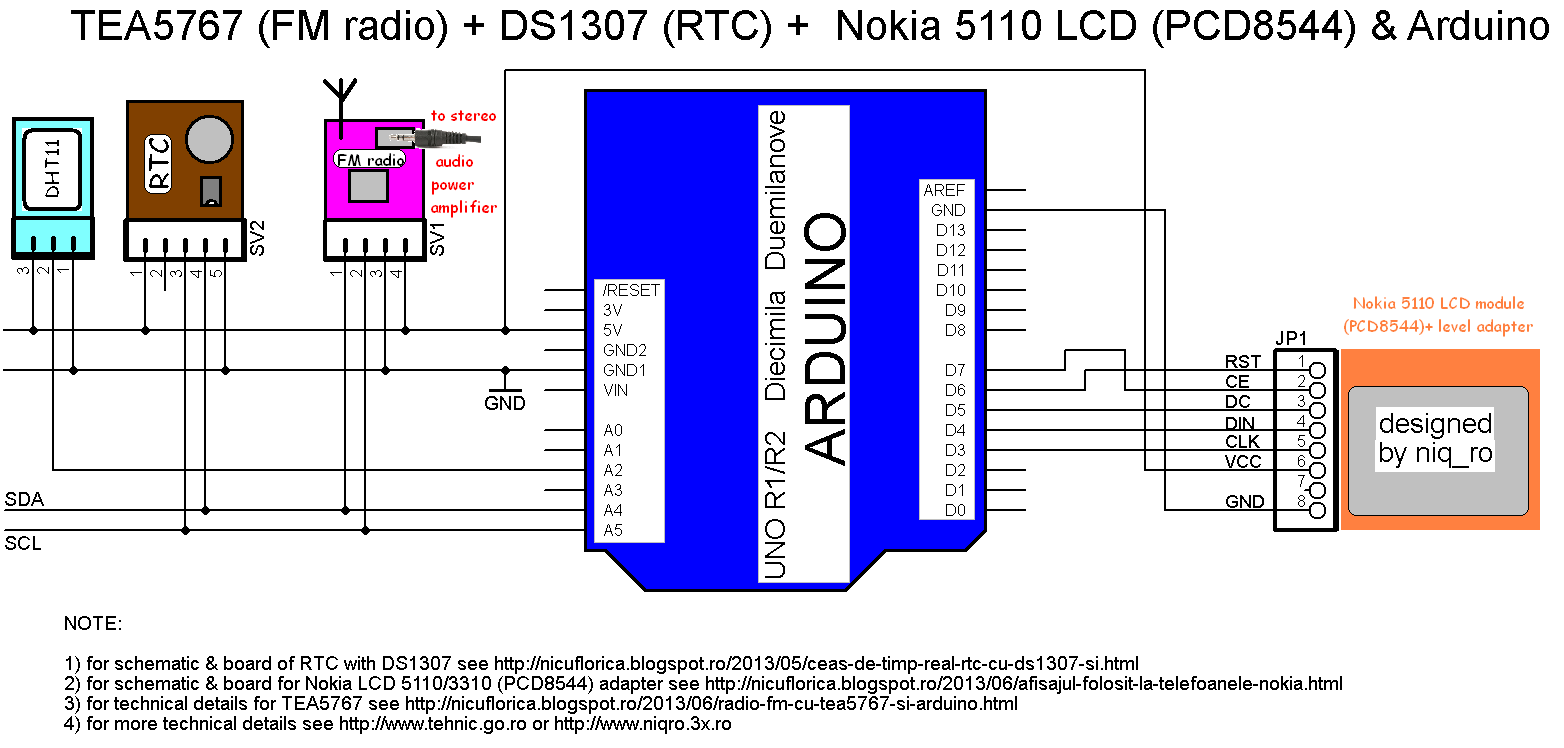
PS: Am conectat si senzorul DHT11 si am informatii despre temperatura si umiditate, dar pare prea "sorcova", asa ca nu am mai "bibilit" la sketch prea mult...
/*********************************************************************
This is an example sketch for our Monochrome Nokia 5110 LCD Displays
  Pick one up today in the adafruit shop!
  ------> http://www.adafruit.com/products/338
These displays use SPI to communicate, 4 or 5 pins are required to
interface
Adafruit invests time and resources providing this open source code,
please support Adafruit and open-source hardware by purchasing
products from Adafruit!
Written by Limor Fried/Ladyada  for Adafruit Industries.
BSD license, check license.txt for more information
All text above, and the splash screen must be included in any redistribution
*********************************************************************/
// Nokia 5110 LCD (PCD8544) from https://code.google.com/p/pcd8544/

/* niq_ro ( http://nicuflorica.blogspot.ro ) case for Nokia 5110 LCD (PCD8544) - LPH 7366:
 For module from China, you must connect like this:
* Pin 1 (RST) -> Arduino digital 6 (D6)
* Pin 2 (CE) -> Arduino digital 7 (D7)
* Pin 3 (DC) -> Arduino digital 5 (D5)
* Pin 4 (DIN) -> Arduino digital 4 (D4)
* Pin 5 (CLK) - Arduino digital 3 (D3)
* Pin 6 (Vcc) -> +5V thru adaptor module (see http://nicuflorica.blogspot.ro/2013/06/afisajul-folosit-la-telefoanele-nokia.html )
* Pin 7 (LIGHT) -> +5V thru 56-100 ohms resistor (for permanent lights) or... other pin control
* Pin 8 (GND) -> GND1 or GND2 
*/

// Date and time functions using a DS1307 RTC connected via I2C and Wire lib
// original sketck from http://learn.adafruit.com/ds1307-real-time-clock-breakout-board-kit/
// add part with SQW=1Hz from http://tronixstuff.wordpress.com/2010/10/20/tutorial-arduino-and-the-i2c-bus/

// adapted sketch by niq_ro from http://nicuflorica.blogspot.ro
// version 4.1 for FM radio with TEA5767 - http://www.tehnic.go.ro

#include <Adafruit_GFX.h>
#include <Adafruit_PCD8544.h>
// Adafruit_PCD8544 display = Adafruit_PCD8544(SCLK, DIN, DC, CS, RST);
Adafruit_PCD8544 display = Adafruit_PCD8544(3, 4, 5, 7, 6);

#include <TEA5767.h>
// from https://github.com/andykarpov/TEA5767
#include <Wire.h>
#include <Button.h>
// from http://arduino-info.wikispaces.com/file/view/Button.zip/405390486/Button.zip

// TEA5767 begin
TEA5767 Radio;
double old_frequency;
double frequency;
int search_mode = 0;
int search_direction;
unsigned long last_pressed;

Button btn_forward(11, PULLUP);
Button btn_backward(12, PULLUP);
// TEA5767 end

#include <DHT.h>
#define DHTPIN A2     // what pin we're connected DHT11
#define DHTTYPE DHT11   // DHT 11 
DHT dht(DHTPIN, DHTTYPE);

#include "RTClib.h"
RTC_DS1307 RTC;

void setup () {

  Wire.begin();
  Radio.init();
  Radio.set_frequency(104.5); 
  Serial.begin(9600);

 // sensor DHT for humidity and temperature 
  dht.begin();
  display.begin();
  // init DHT done

  // you can change the contrast around to adapt the display
  // for the best viewing!
  display.setContrast(55);
  display.clearDisplay();

RTC.begin();
// RTC.adjust(DateTime(__DATE__, __TIME__));
// if you need set clock... just remove // from line above this

// part code for flashing LED
Wire.beginTransmission(0x68);
Wire.write(0x07); // move pointer to SQW address
// Wire.write(0x00); // turns the SQW pin off
 Wire.write(0x10); // sends 0x10 (hex) 00010000 (binary) to control register - turns on square wave at 1Hz
// Wire.write(0x13); // sends 0x13 (hex) 00010011 (binary) 32kHz

Wire.endTransmission();

  if (! RTC.isrunning()) {
    Serial.println("RTC is NOT running!");
    // following line sets the RTC to the date & time this sketch was compiled
    RTC.adjust(DateTime(__DATE__, __TIME__));
  }

  // Print a logo message to the LCD.
  display.setTextSize(1);
  display.setTextColor(BLACK);
  display.setCursor(8,0);
  display.println("tehnic.go.ro");
  display.setCursor(20, 8);
  display.print("& niq_ro");
  display.setCursor(16, 24);
  display.print("radio FM");  
  display.setCursor(5, 32);
  display.print("si ceas/data");
  display.setCursor(0, 40);
  display.print("versiunea ");
  display.setTextColor(WHITE, BLACK);
  display.print("4.1");
  display.display();
  delay (5000);
  display.clearDisplay(); 

}

void loop () {
  
  DateTime now = RTC.now();
  unsigned char buf[5];
  int stereo;
  int signal_level;
  double current_freq;
  unsigned long current_millis = millis();
  
  if (Radio.read_status(buf) == 1) {
    current_freq =  floor (Radio.frequency_available (buf) / 100000 + .5) / 10;
    stereo = Radio.stereo(buf);
    signal_level = Radio.signal_level(buf);

   display.setTextSize(2);
   display.setTextColor(BLACK);

  if (current_freq >=100)
   display.setCursor(0,16);
else
   display.setCursor(12,16);
   display.print(display.print(current_freq));

// erase 2 number from right
   for (int x = 16; x < 30; x++)
   { 
   display.drawLine(60, x, 84, x, WHITE);
   }

   display.setTextSize(1);
   display.setCursor(65,16);
   display.print("MHz");

   display.setCursor(65,24);
   display.setTextSize(1);
   display.setTextColor(WHITE, BLACK);
   if (stereo) display.print("ST"); else display.print("  ");

  // read value from DHT sensor
  int h = dht.readHumidity();
  int t = dht.readTemperature();

   display.setTextColor(BLACK);
   display.setCursor(6,32);
   display.setTextSize(1);
   display.print(h);
   display.print("%H");
   display.setCursor(0,40);
   display.setTextColor(WHITE, BLACK);
   display.print("+");
   display.print(t);
   display.print("^C ");

   
   display.display();
   delay (500);
   display.clearDisplay(); 

// draw a signal level triangle...
   display.drawLine(80, 30, 80, 45, BLACK);
   display.drawLine(80, 45, 50, 45, BLACK);
   display.drawLine(50, 45, 80, 30, BLACK);
// draw an antenna
   display.drawLine(55, 32, 55, 40, BLACK);
   display.drawLine(56, 32, 56, 40, BLACK);
   display.drawLine(52, 32, 55, 36, BLACK);
   display.drawLine(51, 32, 55, 37, BLACK);
   display.drawLine(59, 32, 56, 36, BLACK);
   display.drawLine(60, 32, 56, 37, BLACK);
    

int sl = signal_level;
   for (int x = 0; x < sl; x++)
   { 
   display.drawLine(50+2*x, 45, 50+2*x, 45-x, BLACK);
   }


  }
  
  if (search_mode == 1) {
      if (Radio.process_search (buf, search_direction) == 1) {
          search_mode = 0;
      }
  }
  
  if (btn_forward.isPressed()) {
    last_pressed = current_millis;
    search_mode = 1;
    search_direction = TEA5767_SEARCH_DIR_UP;
    Radio.search_up(buf);
    delay(300);
  }
    
  if (btn_backward.isPressed()) {
    last_pressed = current_millis;
    search_mode = 1;
    search_direction = TEA5767_SEARCH_DIR_DOWN;
    Radio.search_down(buf);
    delay(300);
  } 
   delay(100);


   // need for display time 
   int zs = now.second()/10;
   int us = now.second() - zs*10;
  
  if (us > 2 )
 {
   display.setTextSize(2);
   display.setTextColor(BLACK);
   display.setCursor(0, 0);
   
   
   {   if ( now.hour() < 10)
   {
     display.print(" "); 
     display.print(now.hour(), DEC);
   }
   else
   {
     display.print(now.hour(), DEC);
   }
   display.setCursor(20, 0);
   display.print(":");
   display.setCursor(28, 0);
   if ( now.minute() < 10)
   {
     display.print("0"); 
     display.print(now.minute(), DEC);
   }
   else
   {
   display.print(now.minute(), DEC);
   }

   display.setCursor(48, 0);
   display.print(":");
   display.setCursor(57, 0);
   if ( now.second() < 10)
   {
     display.print("0"); 
     display.print(now.second(), DEC);
   }
   else
   {
   display.print(now.second(), DEC);
   }
   }
 }
 else 
 {
   display.setTextSize(1);
   display.setTextColor(BLACK);
   display.setCursor(16, 0);
   if ( now.hour() < 10)
   {
     display.print(" "); 
     display.print(now.hour(), DEC);
   }
   else
   {
   //  display.setCursor(16, 0);
     display.print(now.hour(), DEC);
   }
   display.print(":");
   if ( now.minute() < 10)
   {
     display.print("0"); 
     display.print(now.minute(), DEC);
   }
   else
   {
   display.print(now.minute(), DEC);
   }
   display.print(":");
   if ( now.second() < 10)
   {
     display.print("0"); 
     display.print(now.second(), DEC);
   }
   else
   {
   display.print(now.second(), DEC);
   }
      
   display.setCursor(10, 8);
   if ( now.day() < 10)
   {
     display.print("0"); 
     display.print(now.day(), DEC);
   }
   else
   {
   display.print(now.day(), DEC);
   }
   display.print("/");
   if ( now.month() < 10)
   {
     display.print("0"); 
     display.print(now.month(), DEC);
   }
   else
   {
   display.print(now.month(), DEC);
   }
   display.print("/");
   display.print(now.year(), DEC);
 }

}
   Schema de conectare devine: