Se afișează postările cu eticheta diy. Afișați toate postările

marți, 12 mai 2015

Testare modul cu 2 relee folosind Arduino

   Pe piata exista un modul cu 2 relee care se alimenteaza la 5V, pentru a fi folosit cu Arduino.
   Pentru a verifica rapid functionarea unui asemenea modul, avand la dispozitie decat o placa Arduino si niste fire Dupont, am facut un mic montaj:
iar ca sketch, am folosit ca baza pe cel numit "Blink" din exemplele programului Arduino IDE.
   Am facut un filmulet, numit test placa cu 2 relee in care apare un Arduino Mega, care este conectat la fel (D8 si D9).
   Schema de conectare este
iar sketch-ul folosit este:
/*
  "Blink" is original sketch
 
  changed sketch by niq_ro for test 2 relay board
  http://nicuflorica.blogspot.ro/
  http://www.tehnic.go.ro
  http://www.niqro.3x.ro
  http://arduinotehniq.blogspot.com/
 */
 
// inputs for relays:
int pin1 = 7;  // D7 for relay 1
int pin2 = 8;  // D8 for relay 2

// the setup routine runs once when you press reset:
void setup() {                
  // initialize the digital pin as an output.
  pinMode(pin1, OUTPUT);     
  pinMode(pin2, OUTPUT);    
 digitalWrite(pin1, LOW);    // turn the relay 1 off by making the voltage LOW 
 digitalWrite(pin2, LOW);    // turn the relay 2 off by making the voltage LOW
}

// the loop routine runs over and over again forever:
void loop() {
  digitalWrite(pin1, HIGH);   // turn the relay 1 on (HIGH is the voltage level)
  delay(1000);               // wait for a second
  digitalWrite(pin1, LOW);    // turn the relay 1 off by making the voltage LOW
  delay(1000);               // wait for a second

  digitalWrite(pin2, HIGH);   // turn the relay 2 on (HIGH is the voltage level)
  delay(1000);               // wait for a second
  digitalWrite(pin2, LOW);    // turn the relay 2 off by making the voltage LOW
  delay(1000);               // wait for a second
}
   

miercuri, 16 octombrie 2013

Termometru dublu cu LM335Z si un afisaj LCD cu 16 coloane si 2 randuri (II)

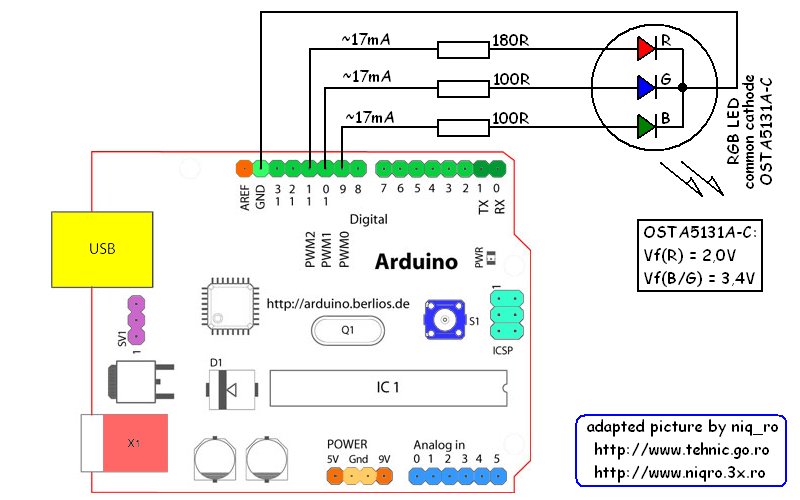
   Mi-am adus aminte de placuta (brick-u') cu LED-ul RGB, de l-am prezentat in articolul Arduino si un LED multicolor (RGB):
si m-am gandit sa fac un "indicator de confort", sa zic asa, adica voi aprinde LED-ul albastru cand este temperatura mai scazuta decat 19 grade Celsius, pe cel verde cand este intre 19 si 26 grade, iar cel rosu daca temperatura este mai mare de 26 grade Celsius.

   Schema de conectare este simpla, combinatia celei de masurare:

 cu cea de afisare cu LED multicolor (RGB):

   Sketch-ul deriva din cel de masurare a 2 temperaturi:
/*
original sketch by niq_ro (Nicu FLORICA) from http://nicuflorica.blogspot.com
version 1.6
program original scris de mine (niq_ro) versiunea 1.6
..............................................................*/

#include <LiquidCrystal.h>
// folosesc libraria pentru afisaje LCD simple
LiquidCrystal lcd(7, 6, 5, 4, 3, 2);
// indic modul de legare, vezi mai jos:
/*                                    -------------------
                                      |  LCD  | Arduino |
                                      -------------------
 LCD RS pin to digital pin 7          |  RS   |   D7    |
 LCD Enable pin to digital pin 6      |  E    |   D6    |
 LCD D4 pin to digital pin 5          |  D4   |   D5    |
 LCD D5 pin to digital pin 4          |  D5   |   D4    |
 LCD D6 pin to digital pin 3          |  D6   |   D3    |
 LCD D7 pin to digital pin 2          |  D7   |   D2    |
 LCD R/W pin to ground                |  R/W  |   GND   |
                                      -------------------
*/
// http://arduino.cc/en/Reference/LiquidCrystalCreateChar

byte home13[8] = {
  B00011,
  B00100,
  B01000,
  B11111,
  B01000,
  B01000,
  B01111,
};

byte home23[8] = {
  B00000,
  B10110,
  B01110,
  B11111,
  B00100,
  B00100,
  B11100,
};

byte home33[8] = {
  B00011,
  B10110,
  B01110,
  B11111,
  B00100,
  B00100,
  B11100,
};

byte home03[8] = {
  B11111,
  B00000,
  B00000,
  B11111,
  B00000,
  B00000,
  B11111,
};

byte grad[8] = {
  B01100,
  B10010,
  B10010,
  B01100,
  B00000,
  B00000,
  B00000,
};

byte copac12[8] = {
  B00111,
  B01000,
  B10101,
  B10010,
  B01000,
  B00111,
  B00001,
  B00001,
};

byte copac22[8] = {
  B11000,
  B00110,
  B10101,
  B01001,
  B00010,
  B11100,
  B10000,
  B10000,
};


// variables 
// variabile 
int t1, t2;
float t10, t20;
float t11, t21;
float t12, t22;

int temperaturePin1 = A0; // output from first LM335 is put at analog input no.0
int temperaturePin2 = A1; // output from second LM335 is put at analog input no.1
// cei 2 senzori de temperaturia LM335 sunt legati la pinii A0 si A1

// other  
int led = 13; //pin for LED
int ledr = 11; //pin for red LED
int leda = 10; //pin for blue LED
int ledv = 9; //pin for green LED

void setup() {
  lcd.createChar(0, grad);
  lcd.createChar(1, home13);
  lcd.createChar(2, home23);
  lcd.createChar(3, home33);
  lcd.createChar(4, home03);
  lcd.createChar(5, copac12);
  lcd.createChar(6, copac22);
   
  lcd.begin(16, 2); // set up the LCD's number of columns and rows: 
 

pinMode(led, OUTPUT); 
 lcd.clear(); // clear the screen
 lcd.setCursor(0, 0); // put cursor at colon 2 and row 0 = left/up
 lcd.print("dual thermometer"); // print a text
 lcd.setCursor(1, 1); // put cursor at colon 0 and row 0 = left/down
 lcd.print("1.6 by niq_ro"); // print a text
 delay (2000);
 lcd.clear(); // clear the screen
 

} // END void setup
  
void loop(){

  digitalWrite(led, HIGH);  

  // Read and store Sensor Data
t11=0;
t21=0;
//lcd.clear(); // clear the screen

for (int x=1; x <= 5; x++)
  {
// calculate the value  
t1 = analogRead(temperaturePin1); // read value from temperature from first sensor (LM335);
 t10 = 100.0*(5.0*t1/1023-2.980)+25.0;
 t11 = t10 + t11;

t2 = analogRead(temperaturePin2); // read value from temperature from second sensor (LM335);
 t20 = 100.0*(5.0*t2/1023-2.980)+25.0;
 t21 = t20 + t21;

delay (500);
  }   

t12 = t11/5.0 -2.0 ; // average and corrected temperature  
t22 = t21/5.0 -1.0; // average and corrected temperature  

/*
t1 = analogRead(temperaturePin1); // read value from temperature from first sensor (LM335);
t2 = analogRead(temperaturePin2); // read value from temperature from first sensor (LM335);
t10 = (100.0*(5.0*t1/1023.0-2.980)+25.0)-1.0;
t20 = (100.0*(5.0*t2/1023.0-2.980)+25.0);
*/

analogWrite(ledr, 0); 
analogWrite(leda, 0); 
analogWrite(ledv, 0); 


    lcd.setCursor(3, 0);
    lcd.write(byte(1));
  //  lcd.write(byte(4));
    lcd.write(byte(3));
    lcd.print(":");
  //  lcd.print("t1="); 
    if (t12<10) lcd.print(" "); 
    if (t12>0.0) lcd.print("+"); 
    lcd.print(t12,1);
  //  lcd.write(0b11011111);
  lcd.write(byte(0));
    lcd.print("C");
      
    lcd.setCursor(3, 1);
  //  lcd.print("ext:");
    lcd.write(byte(5));
    lcd.write(byte(6));
    lcd.print(":");
  //  lcd.print("t2="); 
    if (t22<10) lcd.print(" "); 
    if (t22>0.0) lcd.print("+"); 
    lcd.print(t22,1);
   // lcd.write(0b11011111);
   lcd.write(byte(0));
    lcd.print("C");
    
digitalWrite(led, LOW); 

// temperature leds indicator
if (t12<=19.0) analogWrite(leda, 255);
if ((t12>19.0) and (t12<26.0)) analogWrite(ledv, 255);
if (t12>=26.0) analogWrite(ledr, 255);

delay(500);
lcd.setCursor(4, 0);
lcd.write(byte(2));

}
   
   Am realizat si un filmulet numit home vs outside temperature with LM335 and Arduino (IV), care explica mai bine cum se comporta montajul:
Schema completa este:

joi, 20 iunie 2013

Afisajul folosit la telefoanele Nokia 5110/3310 si Arduino (III)

   Fata de partea a II-a, unde ultima indicatie era de genul:
adica: ora si data scrise cu caractere normale, afisate permanent, iar temperatura si umiditatea cu caractere triple, afisate cu intermitenta cand una cand alta, la interval de 5 secunde), acum am modificat sketch-ul pentru a avea urmatoarele situatii:
- timp de 3 secunde ( cand unitatile de secunde sunt 0, 1 si 2) se afiseaza ra si data scrise cu caractere normale, iar temperatura cu caractere triple:
- timp de 3 secunde (cand unitatile de secunde sunt 3, 4 si 5) se afiseaza ora cu caractere duble, temperatura ramanand ca si inainte:
- timp de 5 secunde (cand unitatile de secunde sunt 6, 7,8 si 9) se afiseaza in continuare ora cu caractere duble, iar umiditatea se afiseaza cu caractere triple:
dupa care se reia intreg ciclul, acesta putand fi inteles mai bine daca vizionati filmuletul date and hour, temperature and humidity with RTC DS1307 DHT11 Nokia LCD PCD8544 with Arduino (IV)
sau in cel cu o calitatea mai buna, numit date and hour, temperature and humidity with RTC DS1307 DHT11 Nokia LCD PCD8544 with Arduino (V)
Sketch-ul folosit este:
/*********************************************************************
This is an example sketch for our Monochrome Nokia 5110 LCD Displays
  Pick one up today in the adafruit shop!
  ------> http://www.adafruit.com/products/338
These displays use SPI to communicate, 4 or 5 pins are required to
interface
Adafruit invests time and resources providing this open source code,
please support Adafruit and open-source hardware by purchasing
products from Adafruit!
Written by Limor Fried/Ladyada  for Adafruit Industries.
BSD license, check license.txt for more information
All text above, and the splash screen must be included in any redistribution
*********************************************************************/

// Date and time functions using a DS1307 RTC connected via I2C and Wire lib
// original sketck from http://learn.adafruit.com/ds1307-real-time-clock-breakout-board-kit/
// add part with SQW=1Hz from http://tronixstuff.wordpress.com/2010/10/20/tutorial-arduino-and-the-i2c-bus/
// Nokia 5110 LCD (PCD8544) from https://code.google.com/p/pcd8544/
// adapted sketch for DHT11 by by niq_ro from http://nicuflorica.blogspot.ro

/* niq_ro ( http://nicuflorica.blogspot.ro ) case for Nokia 5110 LCD (PCD8544) - LPH 7366:
 For module from China, you must connect like this:
* Pin 1 (RST) -> Arduino digital 6 (D6)
* Pin 2 (CE) -> Arduino digital 7 (D7)
* Pin 3 (DC) -> Arduino digital 5 (D5)
* Pin 4 (DIN) -> Arduino digital 4 (D4)
* Pin 5 (CLK) - Arduino digital 3 (D3)
* Pin 6 (Vcc) -> +5V thru adaptor module (see http://nicuflorica.blogspot.ro/2013/06/afisajul-folosit-la-telefoanele-nokia.html )
* Pin 7 (LIGHT) -> +5V thru 56-100 ohms resistor (for permanent lights) or... other pin control
* Pin 8 (GND) -> GND1 or GND2 
*/

// version 1.7

#include <Adafruit_GFX.h>
#include <Adafruit_PCD8544.h>
// Adafruit_PCD8544 display = Adafruit_PCD8544(SCLK, DIN, DC, CS, RST);
Adafruit_PCD8544 display = Adafruit_PCD8544(3, 4, 5, 7, 6);

#include <DHT.h>
#define DHTPIN A2     // what pin we're connected DHT11
#define DHTTYPE DHT11   // DHT 11 
DHT dht(DHTPIN, DHTTYPE);


#include <Wire.h>
#include "RTClib.h"
RTC_DS1307 RTC;

static unsigned char PROGMEM picatura[] =
{ B0001000,
  B0001000,
  B0001000,
  B0010100,
  B0100010,
  B0100010,
  B0011100
};

void setup () {
  
    Serial.begin(9600);

  display.begin();
  // init done

  // you can change the contrast around to adapt the display
  // for the best viewing!
  display.setContrast(50);
  display.clearDisplay();

  // sensor DHT for humidity and temperature 
  dht.begin();

  // Print a logo message to the LCD.
  
  display.setTextSize(1);
  display.setTextColor(BLACK);
  display.setCursor(0,0);
  display.println("tehnic.go.ro");
  display.setCursor(24, 8);
  display.print("& niq_ro");
  display.setCursor(1, 24);
  display.print("ceas-calendar");  
  display.setCursor(0, 32);
  display.print("temp. & umidit");
  display.setCursor(0, 40);
  display.print("versiunea ");
  display.setTextColor(WHITE, BLACK);
  display.print("1.7");
  display.display();
  delay (5000);
  display.clearDisplay(); 
  
  Wire.begin();
  
// part code from http://tronixstuff.wordpress.com/
Wire.beginTransmission(0x68);
Wire.write(0x07); // move pointer to SQW address
Wire.write(0x10); // sends 0x10 (hex) 00010000 (binary) to control register - turns on square wave
Wire.endTransmission();
// end part code from http://tronixstuff.wordpress.com/

    RTC.begin();
// RTC.adjust(DateTime(__DATE__, __TIME__));
// if you need set clock... just remove // from line above this
  if (! RTC.isrunning()) {
    Serial.println("RTC is NOT running!");
    // following line sets the RTC to the date & time this sketch was compiled
    RTC.adjust(DateTime(__DATE__, __TIME__));
  }
}

int k1;
int ko;

void loop () {
  
  DateTime now = RTC.now();
  int h = dht.readHumidity();
  int t = dht.readTemperature();

   // need for display time 
   int zs = now.second()/10;
   int us = now.second() - zs*10;
  
  if (us > 2 )
 {
   display.setTextSize(2);
   display.setTextColor(BLACK);
   display.setCursor(0, 0);
   
   
   {   if ( now.hour() < 10)
   {
     display.print(" "); 
     display.print(now.hour(), DEC);
   }
   else
   {
     display.print(now.hour(), DEC);
   }
   display.setCursor(20, 0);
   display.print(":");
   display.setCursor(28, 0);
   if ( now.minute() < 10)
   {
     display.print("0"); 
     display.print(now.minute(), DEC);
   }
   else
   {
   display.print(now.minute(), DEC);
   }

   display.setCursor(48, 0);
   display.print(":");
   display.setCursor(57, 0);
   if ( now.second() < 10)
   {
     display.print("0"); 
     display.print(now.second(), DEC);
   }
   else
   {
   display.print(now.second(), DEC);
   }
   }
 }
 else 
 {
   display.setTextSize(1);
   display.setTextColor(BLACK);
   display.setCursor(16, 0);
   if ( now.hour() < 10)
   {
     display.print(" "); 
     display.print(now.hour(), DEC);
   }
   else
   {
   //  display.setCursor(16, 0);
     display.print(now.hour(), DEC);
   }
   display.print(":");
   if ( now.minute() < 10)
   {
     display.print("0"); 
     display.print(now.minute(), DEC);
   }
   else
   {
   display.print(now.minute(), DEC);
   }
   display.print(":");
   if ( now.second() < 10)
   {
     display.print("0"); 
     display.print(now.second(), DEC);
   }
   else
   {
   display.print(now.second(), DEC);
   }
      
   display.setCursor(10, 8);
   if ( now.day() < 10)
   {
     display.print("0"); 
     display.print(now.day(), DEC);
   }
   else
   {
   display.print(now.day(), DEC);
   }
   display.print("/");
   if ( now.month() < 10)
   {
     display.print("0"); 
     display.print(now.month(), DEC);
   }
   else
   {
   display.print(now.month(), DEC);
   }
   display.print("/");
   display.print(now.year(), DEC);
 }
     
    if (us < 5 )
   {
   display.setTextSize(4);
   display.setTextColor(BLACK);
   display.setCursor(0,20);
   display.print(t);
   display.setCursor(60,20);
   display.print("C");
   display.setTextSize(2);
   display.setTextColor(BLACK);
   display.setCursor(48,20);
   display.print("o");
   display.display();
   }
else
   {
   display.setTextSize(4);
// display.setTextColor(WHITE, BLACK);
   display.setCursor(0,20);
   display.print(h);
   display.setCursor(60,20);
   display.print("H");
   display.drawBitmap(50, 36,  picatura, 8, 8, 1);
   display.drawBitmap(44, 40,  picatura, 8, 8, 1);
  
   display.setTextSize(2);
   display.setTextColor(BLACK);
   display.setCursor(48,20);
   display.print("%");
   display.display();
   }

delay (500);
display.clearDisplay();  
}

   Schema de conectare a modulelor este aceeasi ca cea din partea a II-a.
   La recomandarea lui Andrei, am "pictat" un pahar, al carui nivel de lichid variaza cu procentul umiditatii:
 
/*********************************************************************
This is an example sketch for our Monochrome Nokia 5110 LCD Displays
  Pick one up today in the adafruit shop!
These displays use SPI to communicate, 4 or 5 pins are required to
interface
Adafruit invests time and resources providing this open source code,
please support Adafruit and open-source hardware by purchasing
products from Adafruit!
Written by Limor Fried/Ladyada  for Adafruit Industries.
BSD license, check license.txt for more information
All text above, and the splash screen must be included in any redistribution
*********************************************************************/

// Date and time functions using a DS1307 RTC connected via I2C and Wire lib
// Nokia 5110 LCD (PCD8544) from https://code.google.com/p/pcd8544/
// adapted sketch for DHT11 by by niq_ro from http://nicuflorica.blogspot.ro

/* niq_ro ( http://nicuflorica.blogspot.ro ) case for Nokia 5110 LCD (PCD8544) - LPH 7366:
 For module from China, you must connect like this:
* Pin 1 (RST) -> Arduino digital 6 (D6)
* Pin 2 (CE) -> Arduino digital 7 (D7)
* Pin 3 (DC) -> Arduino digital 5 (D5)
* Pin 4 (DIN) -> Arduino digital 4 (D4)
* Pin 5 (CLK) - Arduino digital 3 (D3)
* Pin 7 (LIGHT) -> +5V thru 56-100 ohms resistor (for permanent lights) or... other pin control
* Pin 8 (GND) -> GND1 or GND2 
*/

// version 1.8

#include <Adafruit_GFX.h>
#include <Adafruit_PCD8544.h>
// Adafruit_PCD8544 display = Adafruit_PCD8544(SCLK, DIN, DC, CS, RST);
Adafruit_PCD8544 display = Adafruit_PCD8544(3, 4, 5, 7, 6);

#include <DHT.h>
#define DHTPIN A2     // what pin we're connected DHT11
#define DHTTYPE DHT11   // DHT 11 
DHT dht(DHTPIN, DHTTYPE);


#include <Wire.h>
#include "RTClib.h"
RTC_DS1307 RTC;

static unsigned char PROGMEM picatura[] =
{ B0001000,
  B0001000,
  B0001000,
  B0010100,
  B0100010,
  B0100010,
  B0011100
};

void setup () {
  
    Serial.begin(9600);

  display.begin();
  // init done

  // you can change the contrast around to adapt the display
  // for the best viewing!
  display.setContrast(50);
  display.clearDisplay();

  // sensor DHT for humidity and temperature 
  dht.begin();

  // Print a logo message to the LCD.
  
  display.setTextSize(1);
  display.setTextColor(BLACK);
  display.setCursor(0,0);
  display.println("tehnic.go.ro");
  display.setCursor(24, 8);
  display.print("& niq_ro");
  display.setCursor(1, 24);
  display.print("ceas-calendar");  
  display.setCursor(0, 32);
  display.print("temp. & umidit");
  display.setCursor(0, 40);
  display.print("versiunea ");
  display.setTextColor(WHITE, BLACK);
  display.print("1.8");
  display.display();
  delay (5000);
  display.clearDisplay(); 
  
  Wire.begin();
  
Wire.beginTransmission(0x68);
Wire.write(0x07); // move pointer to SQW address
Wire.write(0x10); // sends 0x10 (hex) 00010000 (binary) to control register - turns on square wave
Wire.endTransmission();
// end part code from http://tronixstuff.wordpress.com/

    RTC.begin();
// RTC.adjust(DateTime(__DATE__, __TIME__));
// if you need set clock... just remove // from line above this
  if (! RTC.isrunning()) {
    Serial.println("RTC is NOT running!");
    // following line sets the RTC to the date & time this sketch was compiled
    RTC.adjust(DateTime(__DATE__, __TIME__));
  }
}

int k1;
int ko;

void loop () {
  
  DateTime now = RTC.now();
  int h = dht.readHumidity();
  int t = dht.readTemperature();

   // need for display time 
   int zs = now.second()/10;
   int us = now.second() - zs*10;
  
  if (us > 2 )
 {
   display.setTextSize(2);
   display.setTextColor(BLACK);
   display.setCursor(0, 0);
   
   
   {   if ( now.hour() < 10)
   {
     display.print(" "); 
     display.print(now.hour(), DEC);
   }
   else
   {
     display.print(now.hour(), DEC);
   }
   display.setCursor(20, 0);
   display.print(":");
   display.setCursor(28, 0);
   if ( now.minute() < 10)
   {
     display.print("0"); 
     display.print(now.minute(), DEC);
   }
   else
   {
   display.print(now.minute(), DEC);
   }

   display.setCursor(48, 0);
   display.print(":");
   display.setCursor(57, 0);
   if ( now.second() < 10)
   {
     display.print("0"); 
     display.print(now.second(), DEC);
   }
   else
   {
   display.print(now.second(), DEC);
   }
   }
 }
 else 
 {
   display.setTextSize(1);
   display.setTextColor(BLACK);
   display.setCursor(16, 0);
   if ( now.hour() < 10)
   {
     display.print(" "); 
     display.print(now.hour(), DEC);
   }
   else
   {
   //  display.setCursor(16, 0);
     display.print(now.hour(), DEC);
   }
   display.print(":");
   if ( now.minute() < 10)
   {
     display.print("0"); 
     display.print(now.minute(), DEC);
   }
   else
   {
   display.print(now.minute(), DEC);
   }
   display.print(":");
   if ( now.second() < 10)
   {
     display.print("0"); 
     display.print(now.second(), DEC);
   }
   else
   {
   display.print(now.second(), DEC);
   }
      
   display.setCursor(10, 8);
   if ( now.day() < 10)
   {
     display.print("0"); 
     display.print(now.day(), DEC);
   }
   else
   {
   display.print(now.day(), DEC);
   }
   display.print("/");
   if ( now.month() < 10)
   {
     display.print("0"); 
     display.print(now.month(), DEC);
   }
   else
   {
   display.print(now.month(), DEC);
   }
   display.print("/");
   display.print(now.year(), DEC);
 }
     
    if (us < 5 )
   {
   display.setTextSize(4);
   display.setTextColor(BLACK);
   display.setCursor(0,20);
   display.print(t);
   display.setCursor(60,20);
   display.print("C");
   display.setTextSize(2);
   display.setTextColor(BLACK);
   display.setCursor(48,20);
   display.print("o");
   display.display();
   }
else
   {
   display.setTextSize(4);
// display.setTextColor(WHITE, BLACK);
   display.setCursor(0,20);
   display.print(h);
/*   display.setCursor(60,20);
   display.print("H");
*/
   // draw an empty glass
   display.drawLine(60, 20, 60, 45, BLACK);
   display.drawLine(61, 20, 61, 45, BLACK);
   display.drawLine(60, 44, 80, 44, BLACK);
   display.drawLine(60, 45, 80, 45, BLACK);
   display.drawLine(79, 20, 79, 45, BLACK);
   display.drawLine(80, 20, 80, 45, BLACK);
// display.display();
   int hp = h/4;
   for (int x = 0; x < hp+1; x++)
   { 
   display.drawLine(60, 44-x, 80, 44-x, BLACK);
   }
 // draw drops water
   display.drawBitmap(65, 20,  picatura, 8, 8, 1);
   display.drawBitmap(70, 26,  picatura, 8, 8, 1);
  
   display.setTextSize(2);
   display.setTextColor(BLACK);
   display.setCursor(48,20);
   display.print("%");
   display.display();
   }

delay (500);
display.clearDisplay();  
}